Design system · Open reference

Chart styles. The house figure system, documented.

The tokens, the composition, and the thirteen chart archetypes behind every figure on the growth studies. Rendered live from the same code that ships them, so what you see here is what runs. Take it whole, or swap the palette and keep the rules.

Use it in your own AI skill

The whole system is published as one generated SKILL.md: tokens, anatomy, every archetype with a real example config, the rules, and the TypeScript spec verbatim. Drop it into a skills folder and an agent can produce figures in this idiom, or you can edit the tokens and have it produce figures in yours.

Install (Claude Code)
mkdir -p .claude/skills/omega-point-chart-style
curl -sSo .claude/skills/omega-point-chart-style/SKILL.md \
  https://omegapoint.systems/chart-styles/skill.md

Any agent that reads markdown skills works the same way: fetch the file, keep it beside your other skills, and reference it when you ask for a chart.

Tokens

All colors are OKLCH on a single dark canvas. The ramps do the quiet work; one color does the talking. Gold is the semantic accent and nothing else: it marks the threshold, the median, the hero number, the emphasis span. The other five are data series, never accents.

Canvas
--bg
oklch(0.135 0.008 50)
Canvas. Every figure is dark; there is no light variant.
Ink ramp
--ink
oklch(0.945 0.02 80)
Primary text: headlines, big numbers, values.
--ink-2
oklch(0.82 0.018 80)
Secondary text: the card standfirst, the wordmark.
--ink-4
oklch(0.47 0.012 80)
Muted labels: axis text, stat labels, footer.
Hairlines
--rule
oklch(0.32 0.010 50)
Strongest hairline.
--rule-2
oklch(0.26 0.009 50)
Mid hairline.
--rule-3
oklch(0.205 0.008 50)
Faintest hairline: stat-row dividers, muted waffle cells, grid lines.
Semantic accent
--c1
oklch(0.78 0.12 75)
Gold. The SEMANTIC accent only: the threshold, the median dot, the hero number, the headline emphasis, the "now" rule. Never decoration, never a data series.
Data series
--c2
oklch(0.66 0.15 25)
Oxblood. Data series.
--c3
oklch(0.70 0.10 150)
Forest. Data series.
--c4
oklch(0.66 0.11 245)
Navy. Data series.
--c5
oklch(0.64 0.10 320)
Plum. Data series.
--c6
oklch(0.80 0.11 62)
Amber. Data series. Warm, so keep it non-adjacent to gold in any ordered sweep.
Type
Aa 93%
--serif
var(--serif-font), "Newsreader", serif
Newsreader. Headlines, big numbers, standfirst.
Aa 93%
--sans
var(--sans-font), system-ui, sans-serif
Geist. Rarely used on figures.
2,000 MSG
--mono
var(--mono-font), "Geist Mono", monospace
Geist Mono. Every label: axis, annotation, meta, stats, footer. Uppercase with tracking.

Composition

One config renders three ways. The order never changes: the headline states the idea, the chart proves it, the stat row quantifies it, the footer sources it.

Anatomy of a 16:9 figure: header row, funnel bar, headline with gold-italic emphasis, chart, stat row, footer
Figure 16:9
Export
3200 × 1800 px
Padding
54px top · 64px sides · 40px bottom (at 1600 × 900)
Chart viewBox
0 0 1080 250
  • Header row: brand mark + mono wordmark left, uppercase mono meta right.
  • Funnel bar: six AARRR segments; the active stage is thicker and labeled.
  • Headline: serif, 58px, line-height 1.03, with one gold-italic emphasis span.
  • Chart: the archetype SVG, full width, scaled to its viewBox.
  • Stat row: three values at 28px with a gold <b> emphasis, mono uppercase labels beneath, hairline dividers.
  • Footer: two mono uppercase lines, study name left, source right.
Card 4:5
Export
2400 × 3000 px
Padding
64px top · 60px sides · 52px bottom (at 1200 × 1500)
Chart viewBox
0 0 1080 680
  • Same config, same primitives, portrait. Text-forward: headline at 62px plus a 24px serif standfirst in --ink-2.
  • The chart band is flex: 1 and vertically centers the archetype's taller card variant.
  • Axis and annotation labels scale up (.axis-card / .anno-card) so a phone-sized view stays legible.
Carousel 4:5 per slide
Export
one PNG per slide
Padding
as Card
Chart viewBox
0 0 1080 680
  • Slide count = 3 + narrative lines: hook + chart, one story slide per narrative line paired with a stat, an education slide, a closing slide.
  • Education slide pulls a metric definition and formula when metricSlug is set, else the AARRR stage glossary.
  • Legibility first: big type, generous whitespace, because it is read small on a phone.

The thirteen archetypes

Pick by the shape of the data you actually have, not by the chart you would like to draw. Each one below is rendered live from a shipped config, followed by the exported figure and card, and the config itself.

  1. Line + threshold
  2. Vertical bar
  3. Horizontal range
  4. Donut
  5. Heatmap
  6. Gantt
  7. Small multiples
  8. Waffle
  9. Proportional area
  10. Parliament
  11. Venn
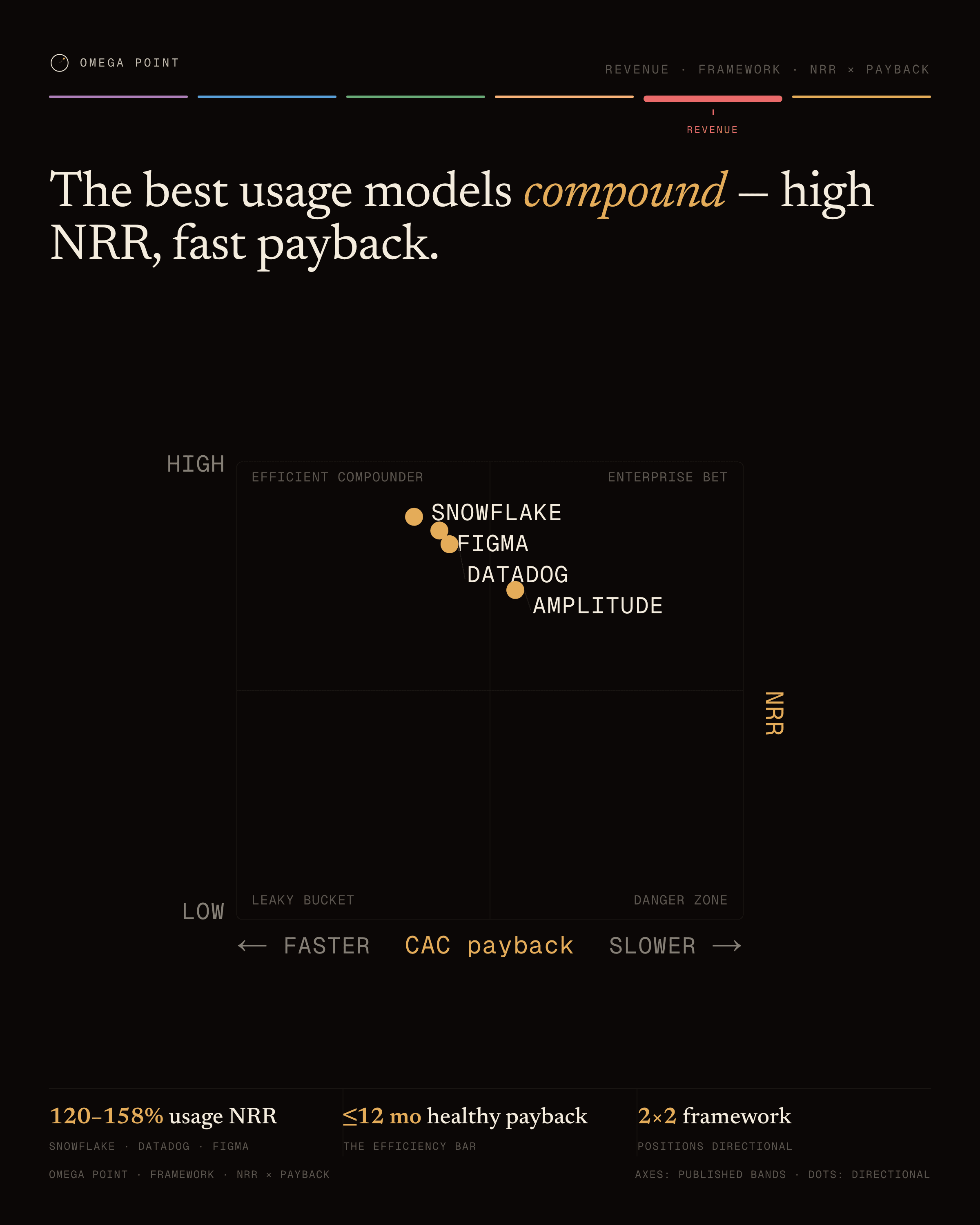
  12. 2×2 matrix
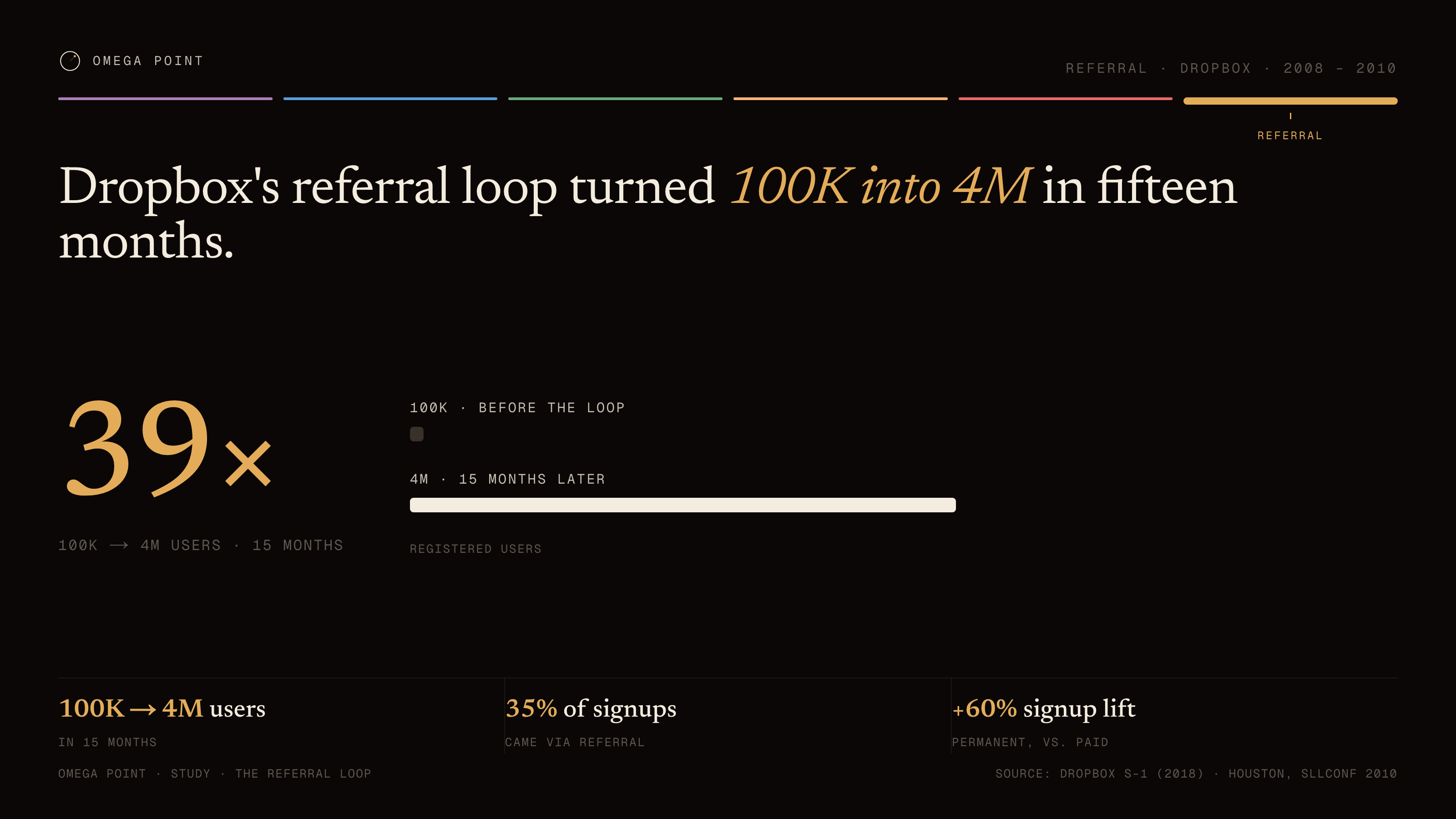
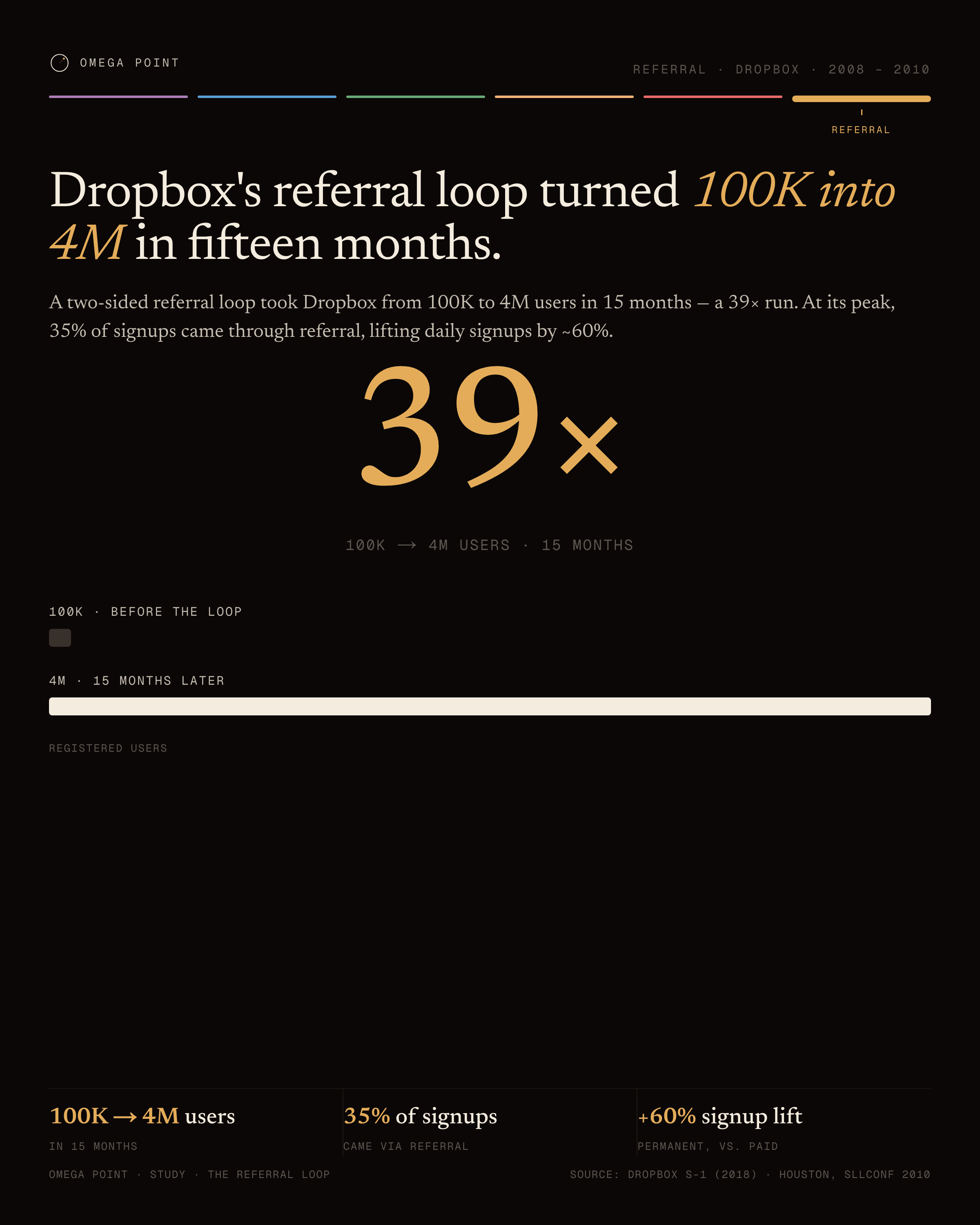
  13. Number plate
№ 01 · line-threshold

Line + threshold

Use for
A logistic S-curve with one threshold that separates outcomes.
Data shape
Four logistic parameters (floor, amplitude, midpoint, steepness), a plateau, a threshold x, and one annotated marker.
Config type
LineThresholdChart
Example
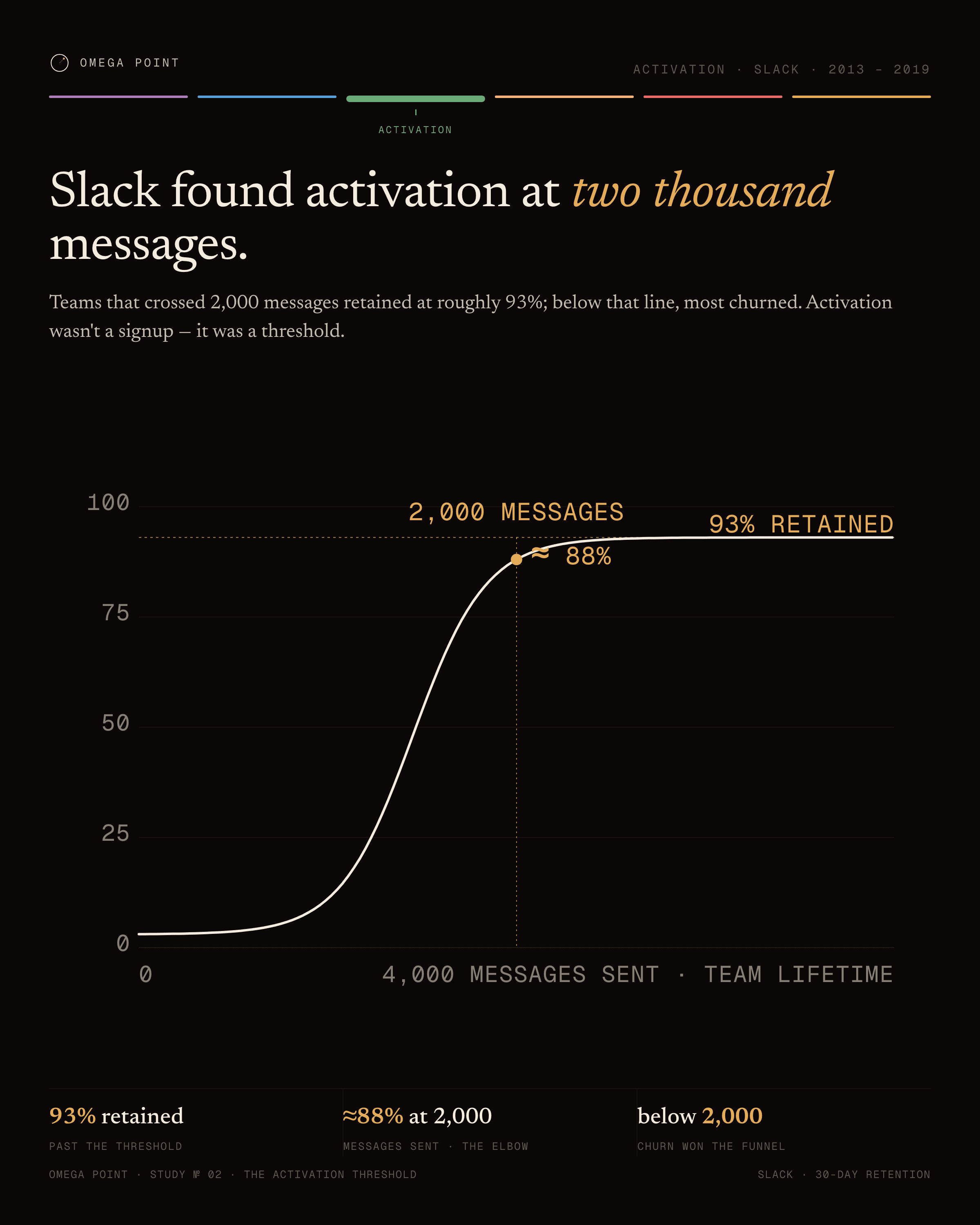
“Slack found activation at two thousand messages.” · live render →
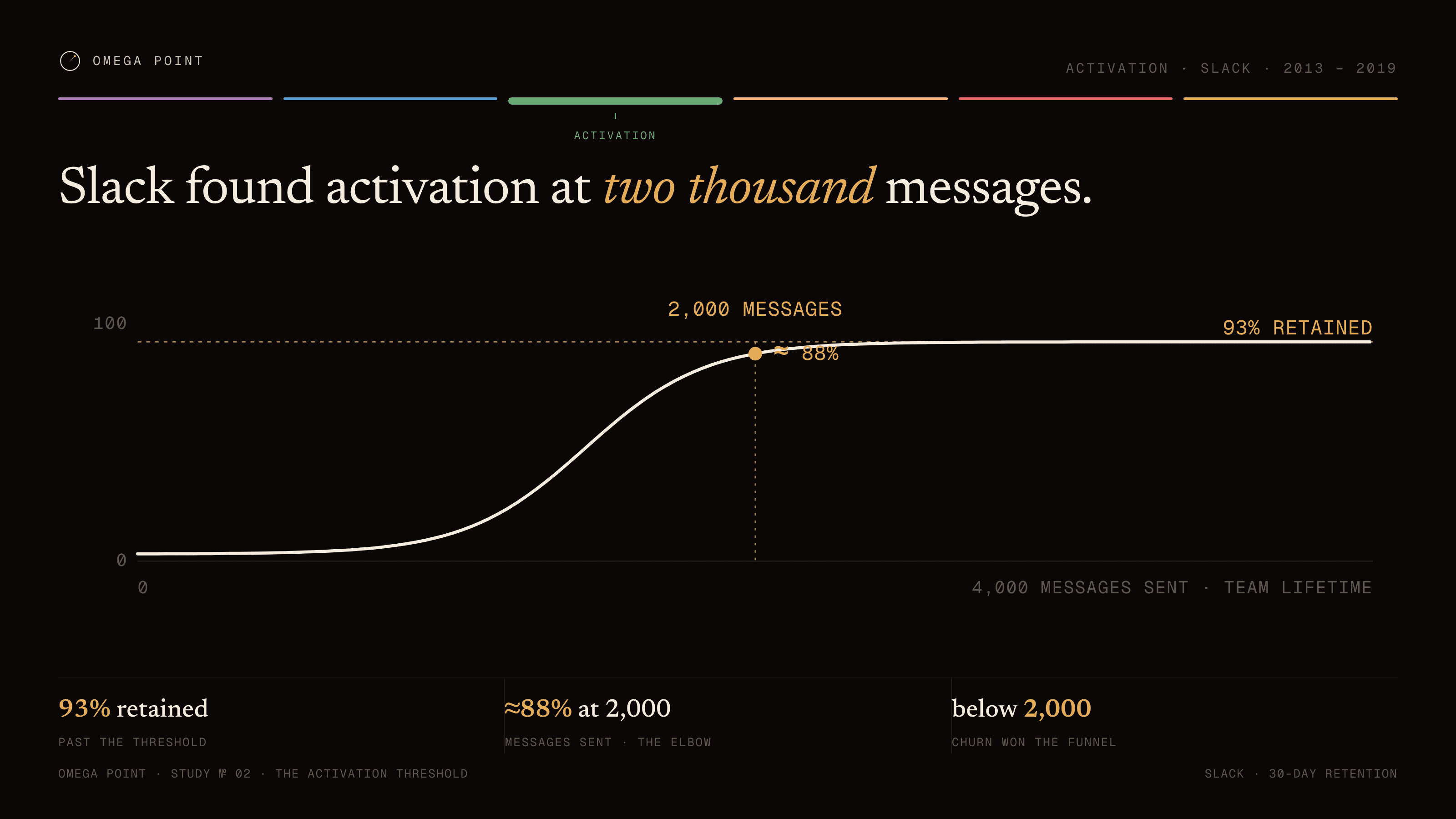
93% RETAINED2,000 MESSAGES100004,000 MESSAGES SENT · TEAM LIFETIME≈ 88%
Line + threshold example, 16:9 figure: Slack found activation at two thousand messages.Line + threshold example, 4:5 social card: Slack found activation at two thousand messages.
The config behind it · chart: LineThresholdChart
{
  "fn": {
    "floor": 3,
    "amp": 90,
    "mid": 1450,
    "steep": 194
  },
  "xMax": 4000,
  "yMax": 100,
  "plateau": {
    "y": 93,
    "label": "93% RETAINED"
  },
  "threshold": {
    "x": 2000,
    "label": "2,000 MESSAGES"
  },
  "marker": {
    "x": 2000,
    "y": 88,
    "label": "≈ 88%"
  },
  "xAxisLabel": "4,000 MESSAGES SENT · TEAM LIFETIME"
}
№ 02 · vertical-bar

Vertical bar

Use for
Magnitude over time, or across a few categories.
Data shape
An ordered list of bars, each with a label, a value, and a pre-formatted display string.
Config type
VerticalBarChart
Example
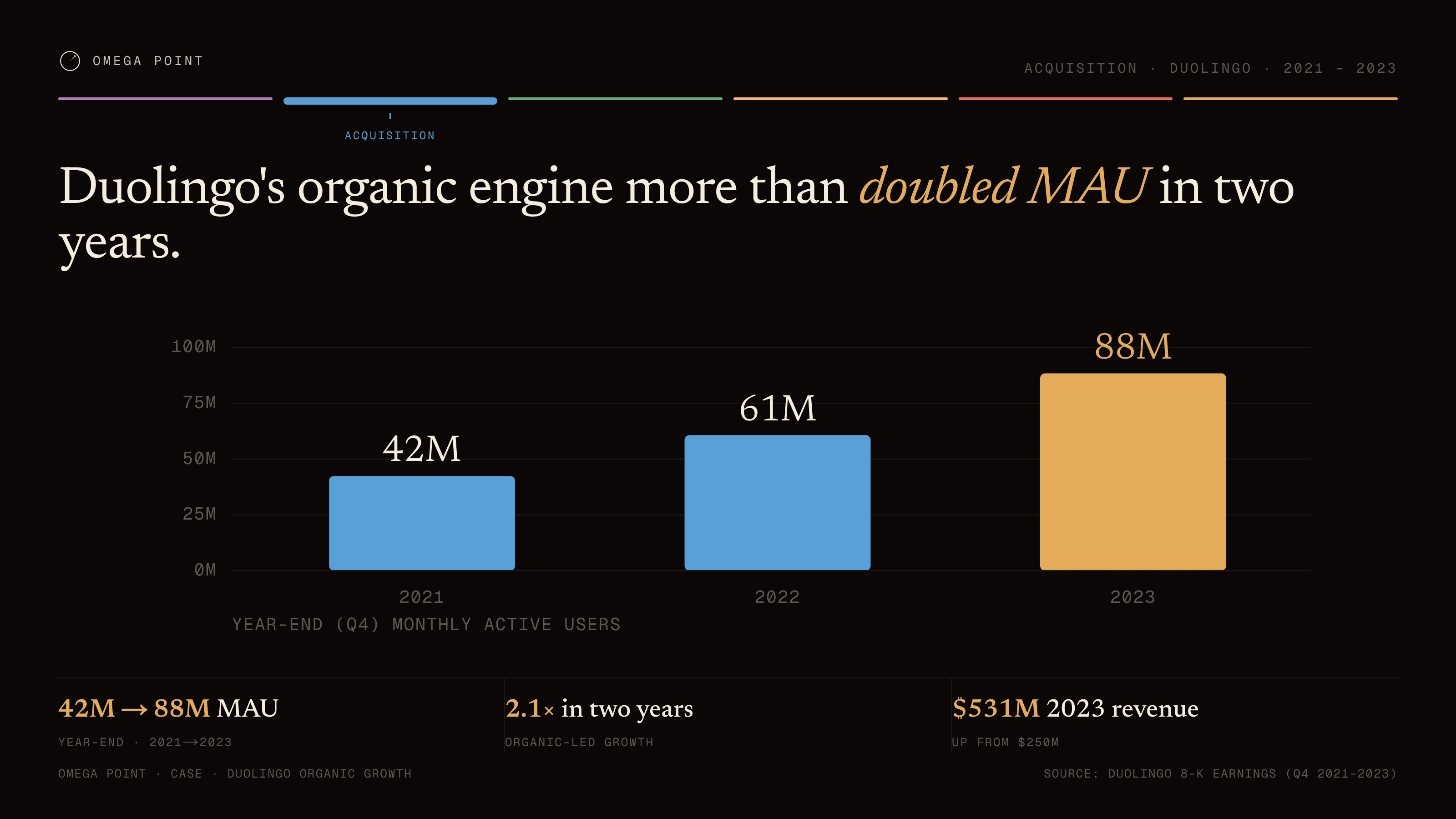
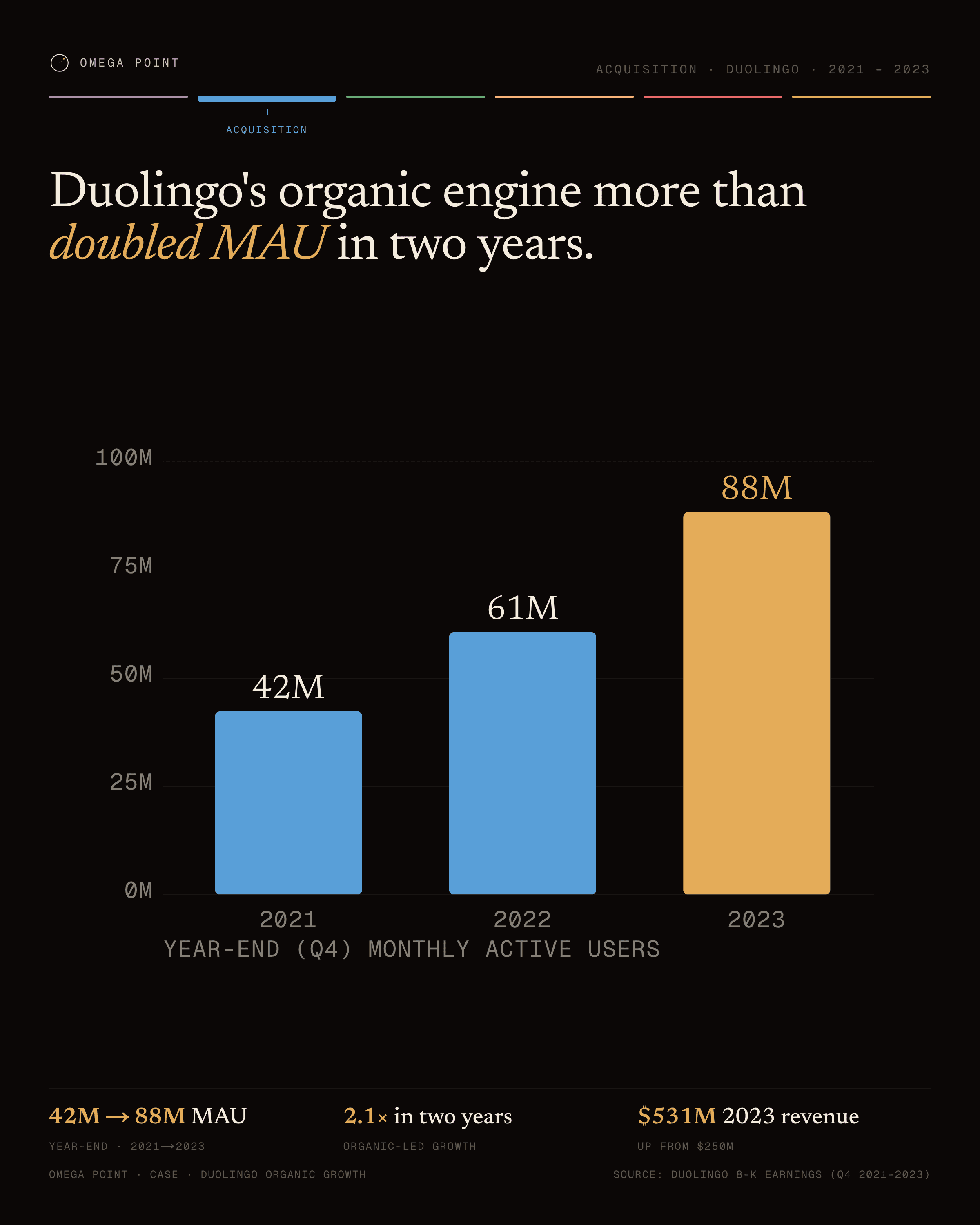
“Duolingo's organic engine more than doubled MAU in two years.” · live render →
0M25M50M75M100M42M202161M202288M2023YEAR-END (Q4) MONTHLY ACTIVE USERS
Vertical bar example, 16:9 figure: Duolingo's organic engine more than doubled MAU in two years.Vertical bar example, 4:5 social card: Duolingo's organic engine more than doubled MAU in two years.
The config behind it · chart: VerticalBarChart
{
  "bars": [
    {
      "label": "2021",
      "value": 42.4,
      "display": "42M"
    },
    {
      "label": "2022",
      "value": 60.7,
      "display": "61M"
    },
    {
      "label": "2023",
      "value": 88.4,
      "display": "88M"
    }
  ],
  "domainMax": 100,
  "gridTicks": [
    0,
    25,
    50,
    75,
    100
  ],
  "unit": "M",
  "yAxisLabel": "YEAR-END (Q4) MONTHLY ACTIVE USERS"
}
№ 03 · horizontal-range

Horizontal range

Use for
Low–high ranges with a median across categories: distributions, benchmark bands.
Data shape
Rows of label + low + high on a shared domain, with explicit grid ticks and a unit.
Config type
RangeChart
Example
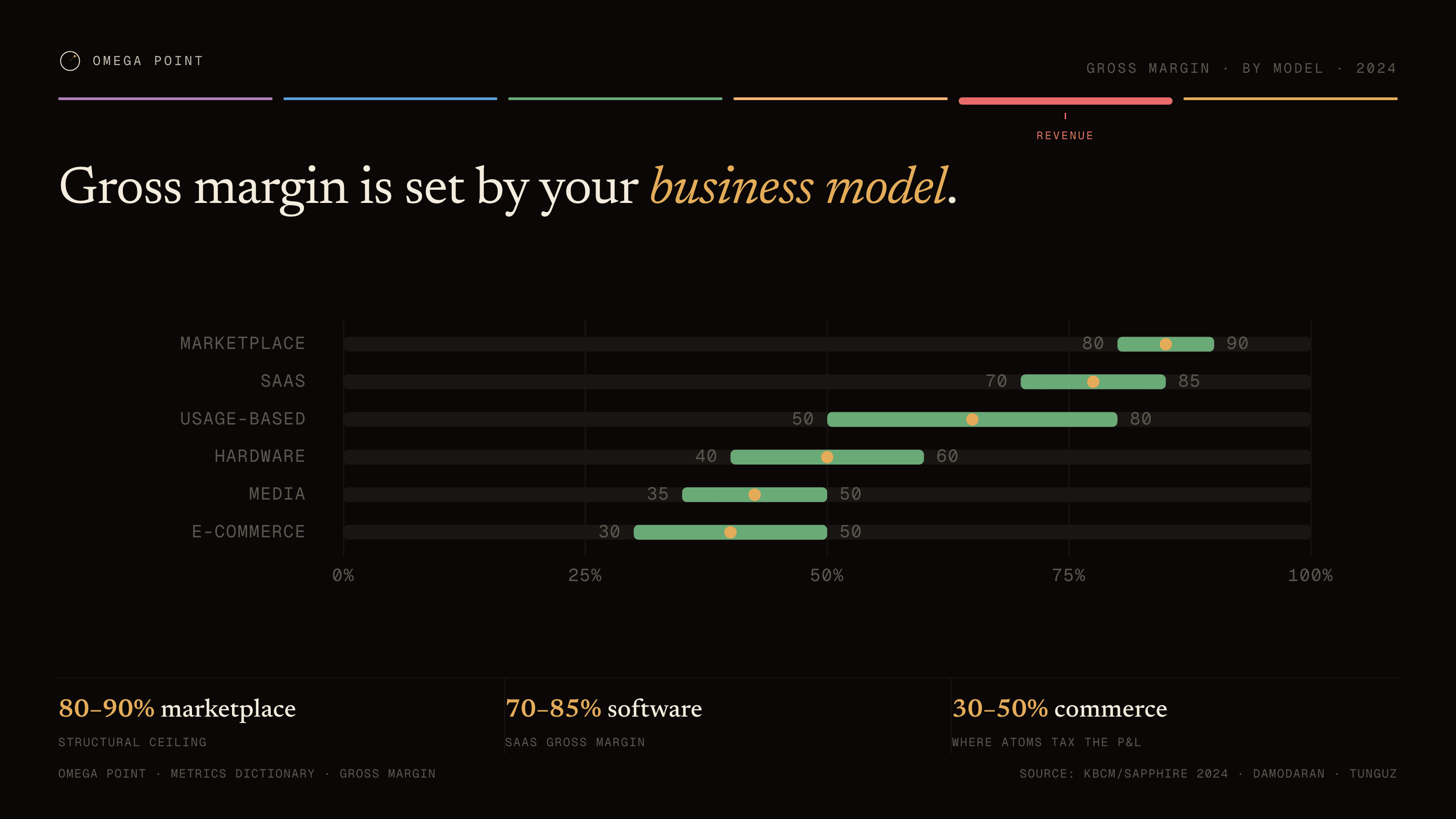
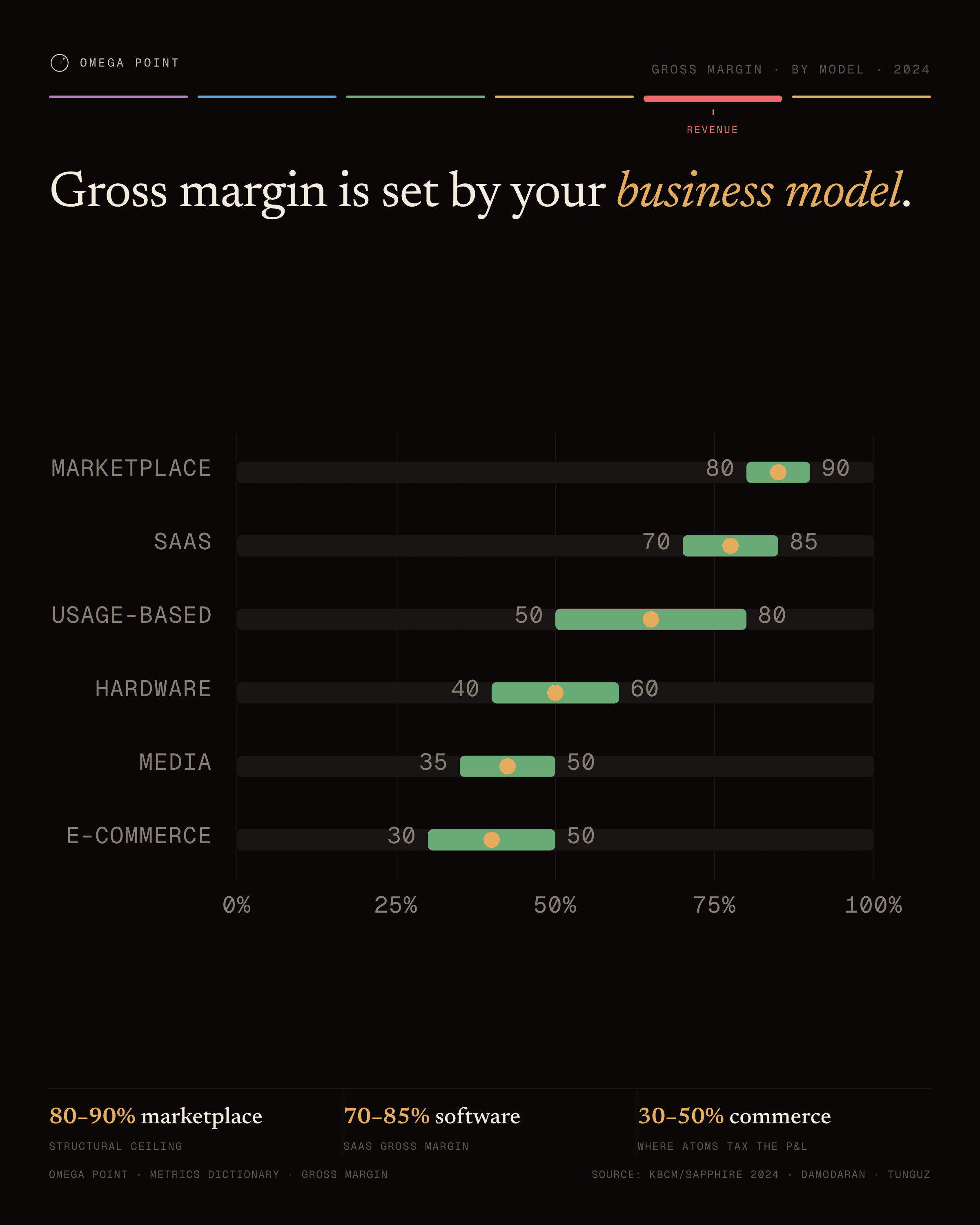
“Gross margin is set by your business model.” · live render →
0%25%50%75%100%Marketplace8090SaaS7085Usage-based5080Hardware4060Media3550E-commerce3050
Horizontal range example, 16:9 figure: Gross margin is set by your business model.Horizontal range example, 4:5 social card: Gross margin is set by your business model.
The config behind it · chart: RangeChart
{
  "rows": [
    {
      "label": "Marketplace",
      "low": 80,
      "high": 90
    },
    {
      "label": "SaaS",
      "low": 70,
      "high": 85
    },
    {
      "label": "Usage-based",
      "low": 50,
      "high": 80
    },
    {
      "label": "Hardware",
      "low": 40,
      "high": 60
    },
    {
      "label": "Media",
      "low": 35,
      "high": 50
    },
    {
      "label": "E-commerce",
      "low": 30,
      "high": 50
    }
  ],
  "domainMax": 100,
  "gridTicks": [
    0,
    25,
    50,
    75,
    100
  ],
  "unit": "%"
}
№ 04 · donut

Donut

Use for
Parts of a whole, five slices or fewer, with a centered total.
Data shape
Slices with label, value, color token, and a pre-formatted percent; a center value and label.
Config type
DonutChart
Example
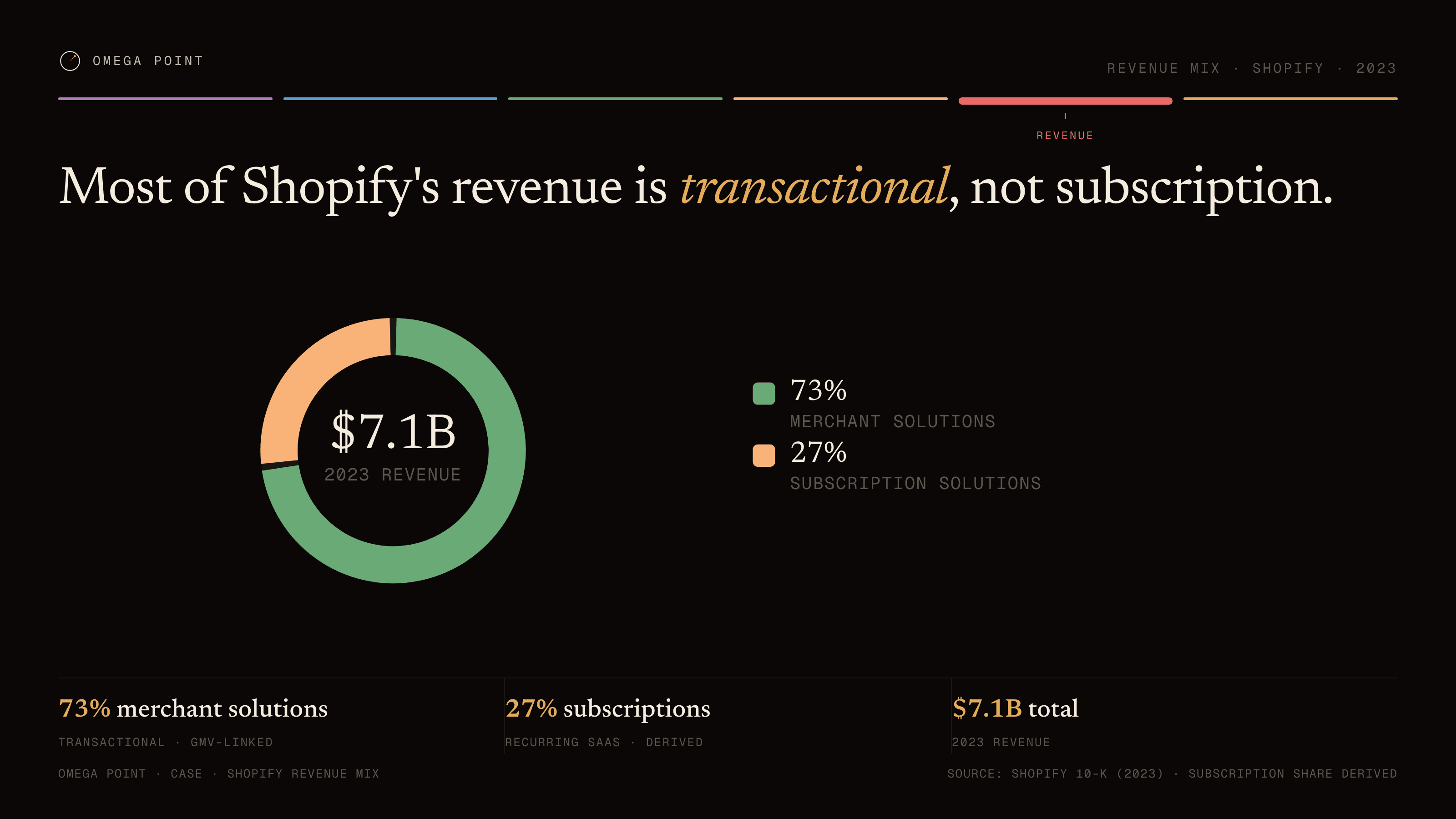
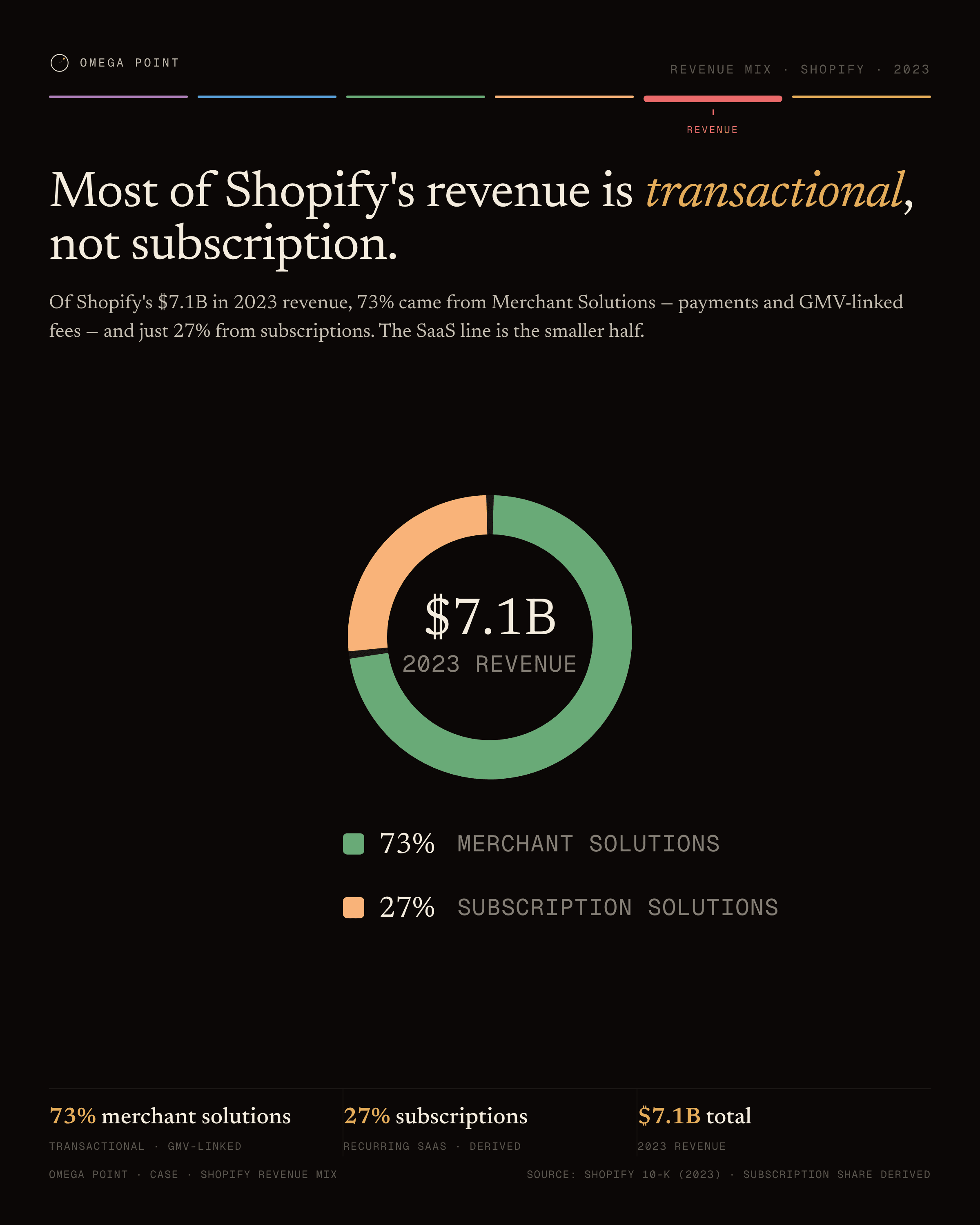
“Most of Shopify's revenue is transactional, not subscription.” · live render →
$7.1B2023 REVENUE73%Merchant Solutions27%Subscription Solutions
Donut example, 16:9 figure: Most of Shopify's revenue is transactional, not subscription.Donut example, 4:5 social card: Most of Shopify's revenue is transactional, not subscription.
The config behind it · chart: DonutChart
{
  "slices": [
    {
      "label": "Merchant Solutions",
      "value": 73,
      "color": "var(--c3)",
      "pct": "73%"
    },
    {
      "label": "Subscription Solutions",
      "value": 27,
      "color": "var(--c6)",
      "pct": "27%"
    }
  ],
  "centerValue": "$7.1B",
  "centerLabel": "2023 REVENUE"
}
№ 05 · heatmap

Heatmap

Use for
A grid where the value is the cell's luminance: cohorts, benchmarks by segment.
Data shape
Row labels × column labels, a matching cell grid of label + value, one base color, and the value that maps to full opacity.
Config type
HeatmapChart
Example
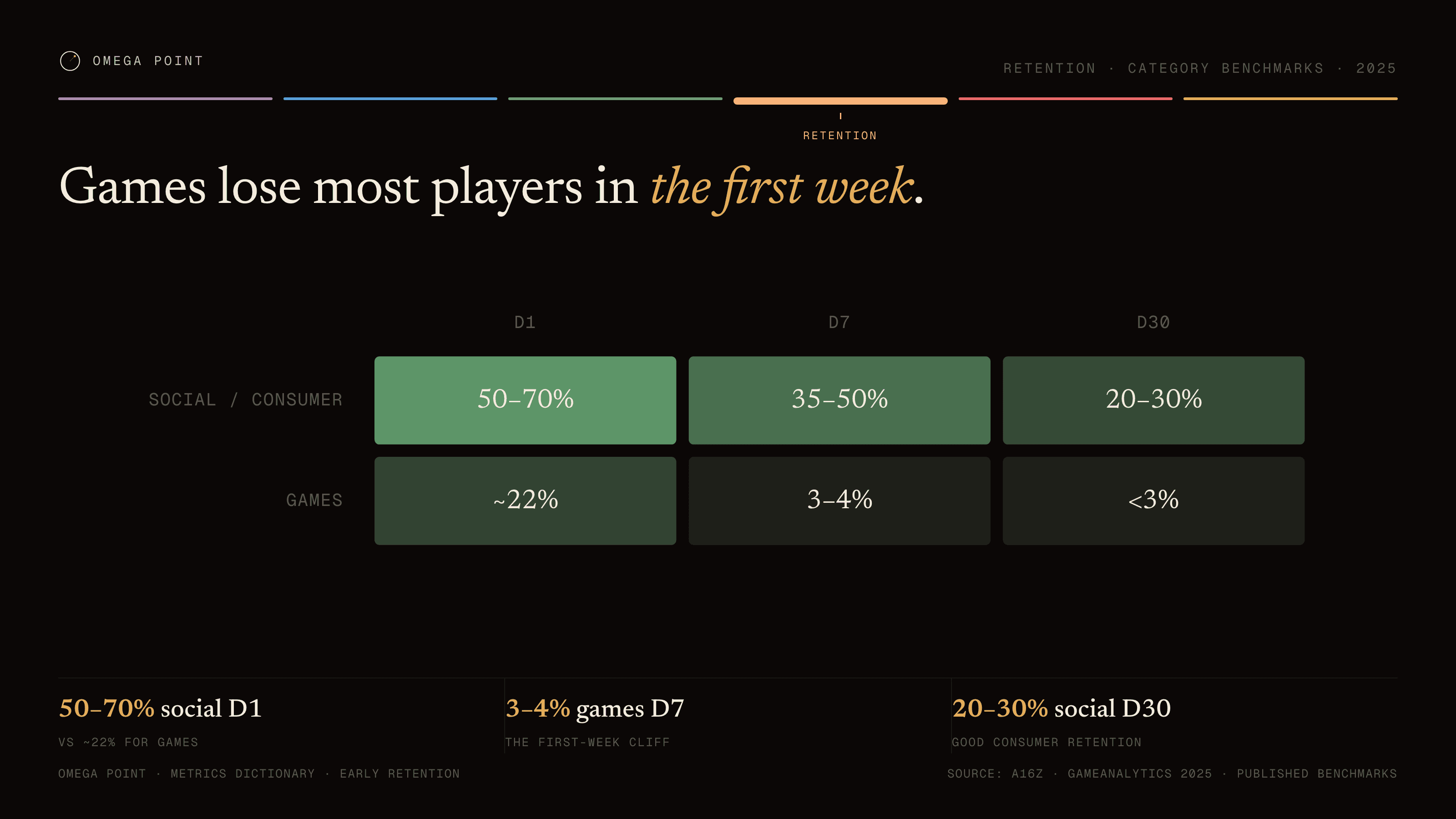
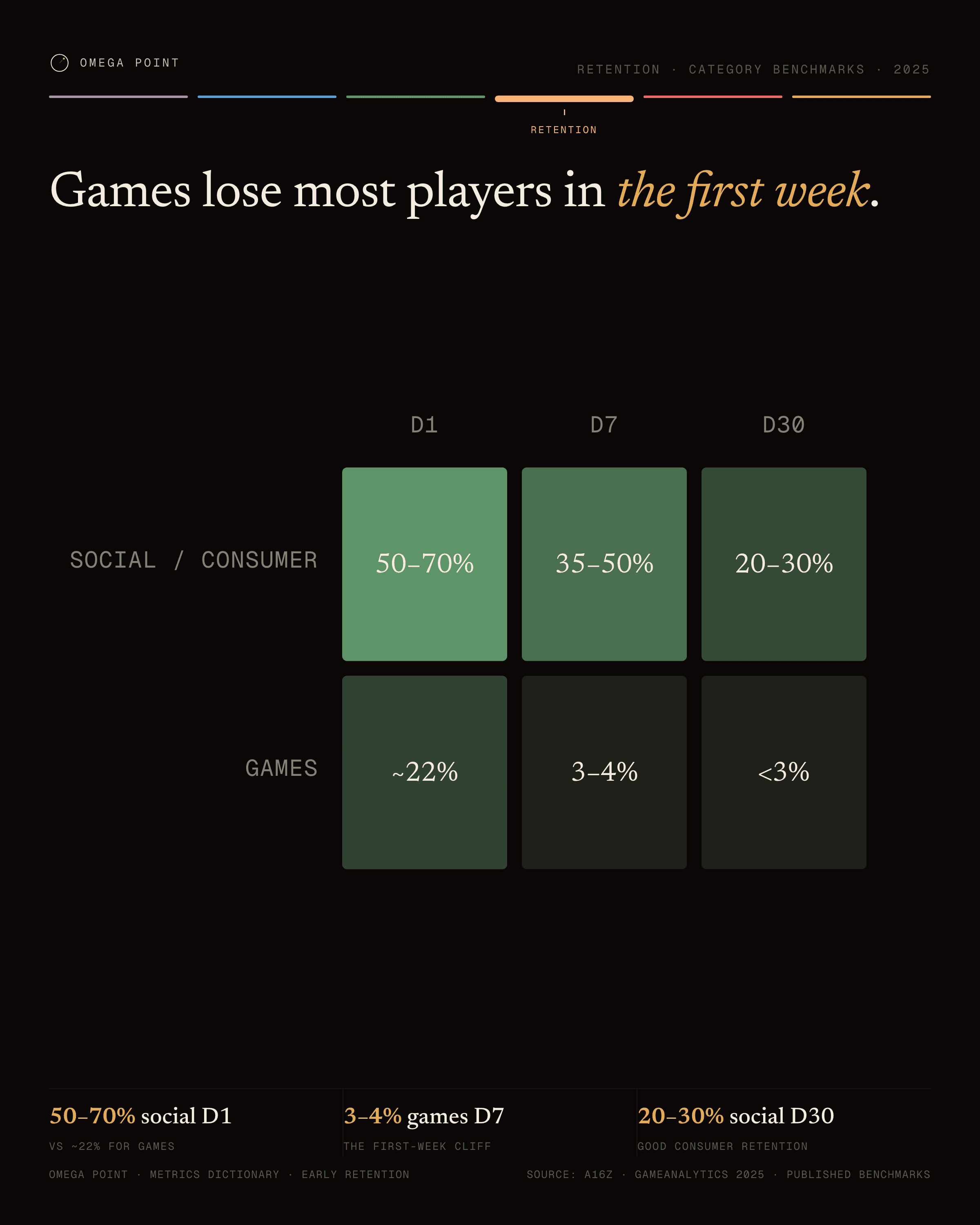
“Games lose most players in the first week.” · live render →
D1D7D30Social / ConsumerGames50–70%35–50%20–30%~22%3–4%<3%
Heatmap example, 16:9 figure: Games lose most players in the first week.Heatmap example, 4:5 social card: Games lose most players in the first week.
The config behind it · chart: HeatmapChart
{
  "rows": [
    "Social / Consumer",
    "Games"
  ],
  "cols": [
    "D1",
    "D7",
    "D30"
  ],
  "cells": [
    [
      {
        "label": "50–70%",
        "value": 60
      },
      {
        "label": "35–50%",
        "value": 42.5
      },
      {
        "label": "20–30%",
        "value": 25
      }
    ],
    [
      {
        "label": "~22%",
        "value": 22
      },
      {
        "label": "3–4%",
        "value": 3.5
      },
      {
        "label": "<3%",
        "value": 2
      }
    ]
  ],
  "colorBase": "var(--c3)",
  "maxValue": 70
}
№ 06 · gantt

Gantt

Use for
Discrete intervals on a shared timeline with a gold "now" rule.
Data shape
Items with a label and a start year, a domain start/end, the year of the now-rule, and axis ticks.
Config type
GanttChart
Example
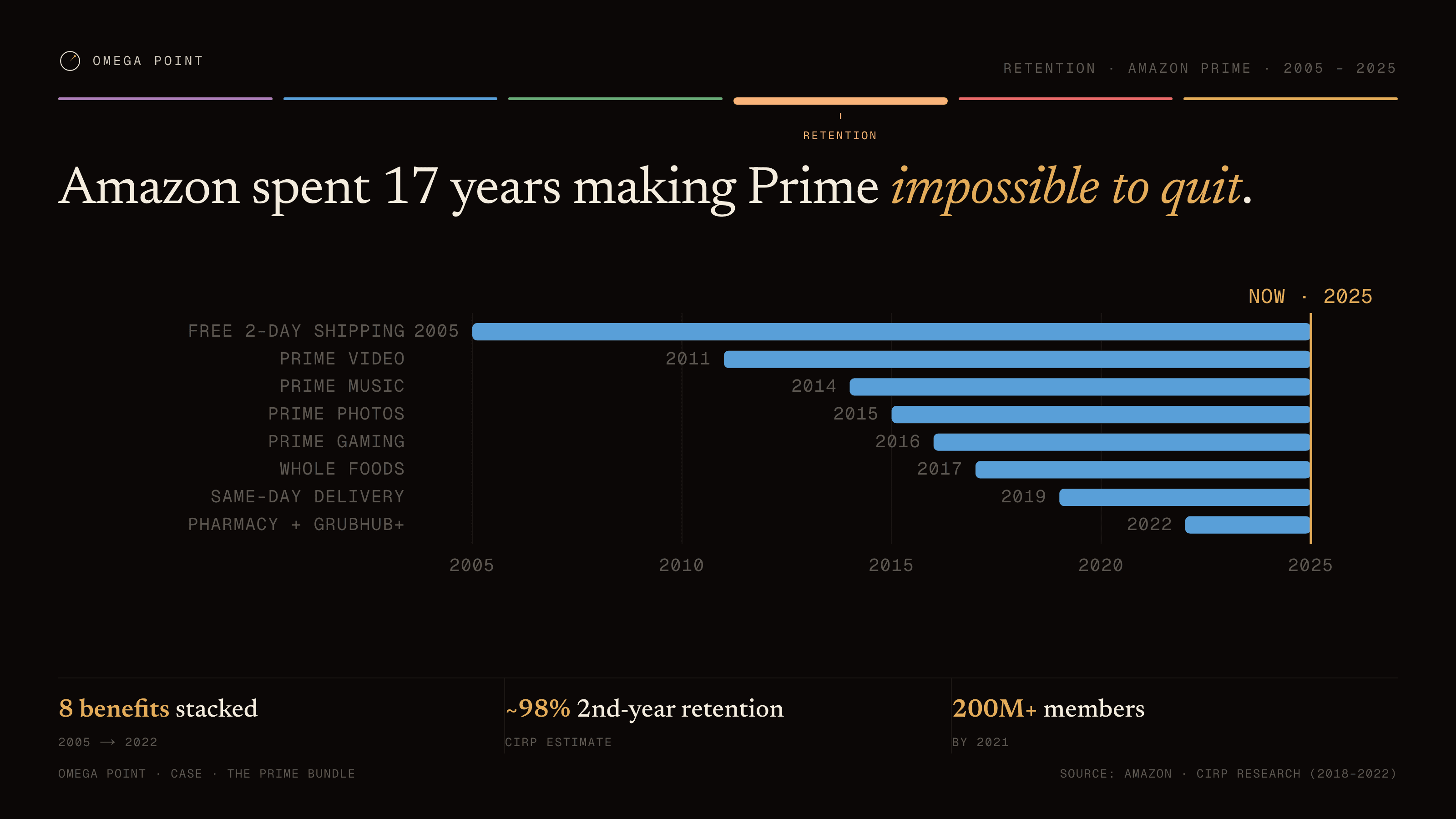
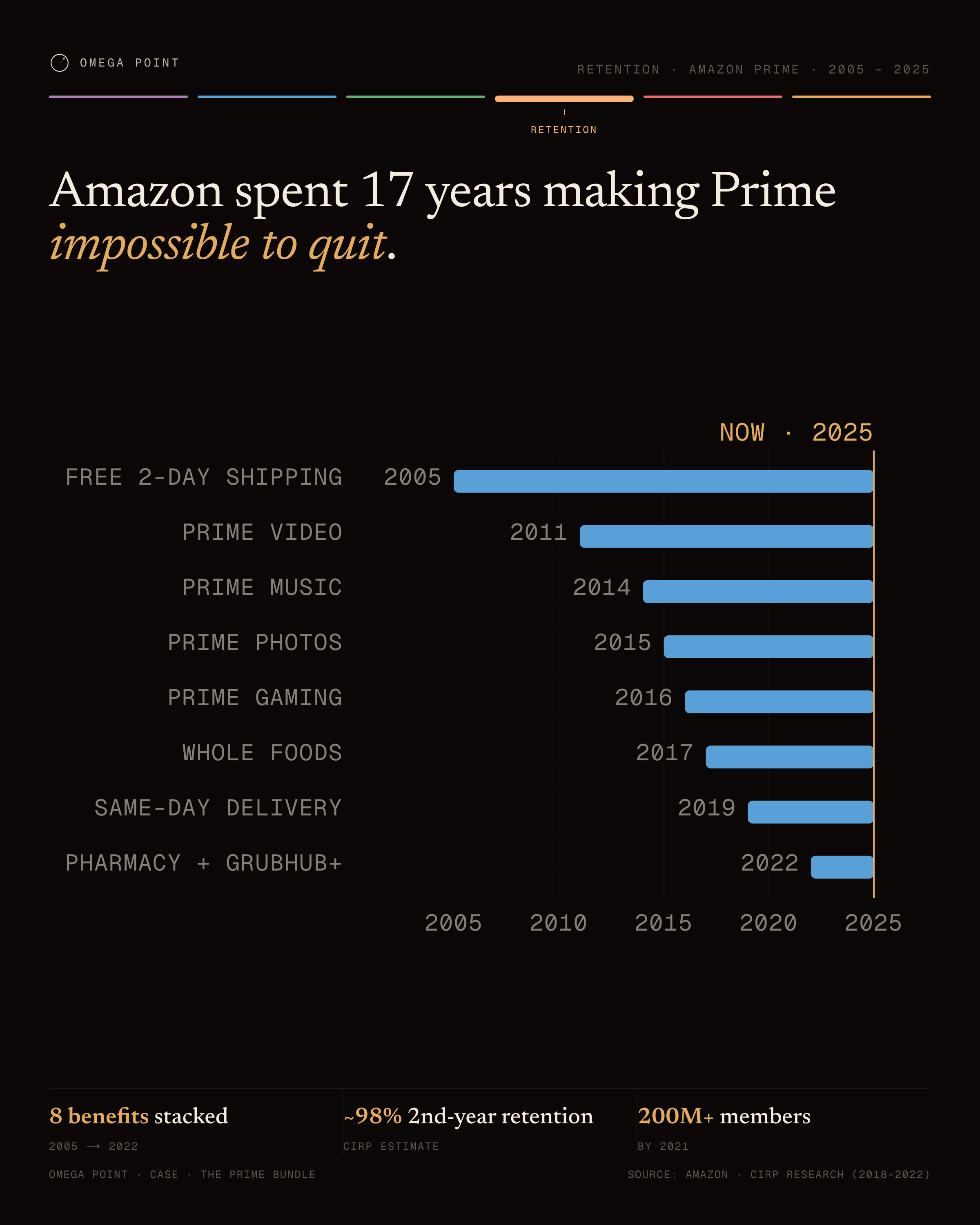
“Amazon spent 17 years making Prime impossible to quit.” · live render →
Free 2-day shipping2005Prime Video2011Prime Music2014Prime Photos2015Prime Gaming2016Whole Foods2017Same-day delivery2019Pharmacy + Grubhub+2022NOW · 202520052010201520202025
Gantt example, 16:9 figure: Amazon spent 17 years making Prime impossible to quit.Gantt example, 4:5 social card: Amazon spent 17 years making Prime impossible to quit.
The config behind it · chart: GanttChart
{
  "items": [
    {
      "label": "Free 2-day shipping",
      "start": 2005
    },
    {
      "label": "Prime Video",
      "start": 2011
    },
    {
      "label": "Prime Music",
      "start": 2014
    },
    {
      "label": "Prime Photos",
      "start": 2015
    },
    {
      "label": "Prime Gaming",
      "start": 2016
    },
    {
      "label": "Whole Foods",
      "start": 2017
    },
    {
      "label": "Same-day delivery",
      "start": 2019
    },
    {
      "label": "Pharmacy + Grubhub+",
      "start": 2022
    }
  ],
  "domainStart": 2004,
  "domainEnd": 2025,
  "nowYear": 2025,
  "axisTicks": [
    2005,
    2010,
    2015,
    2020,
    2025
  ]
}
№ 07 · small-multiples

Small multiples

Use for
The same mini-chart repeated across categories so they can be compared at a glance.
Data shape
Panels with label, value, and display string on one shared domain, plus one reference gridline.
Config type
SmallMultiplesChart
Example
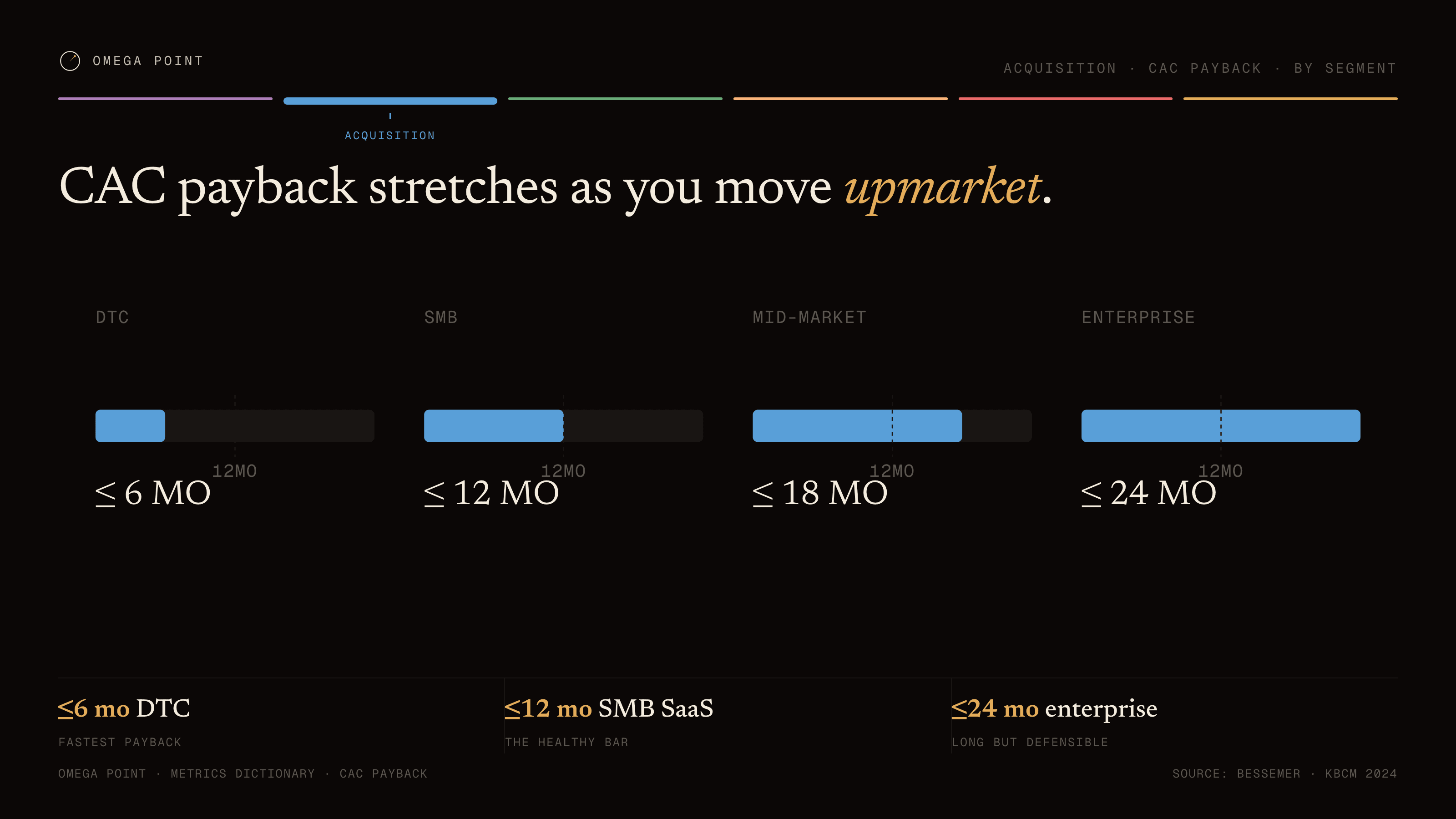
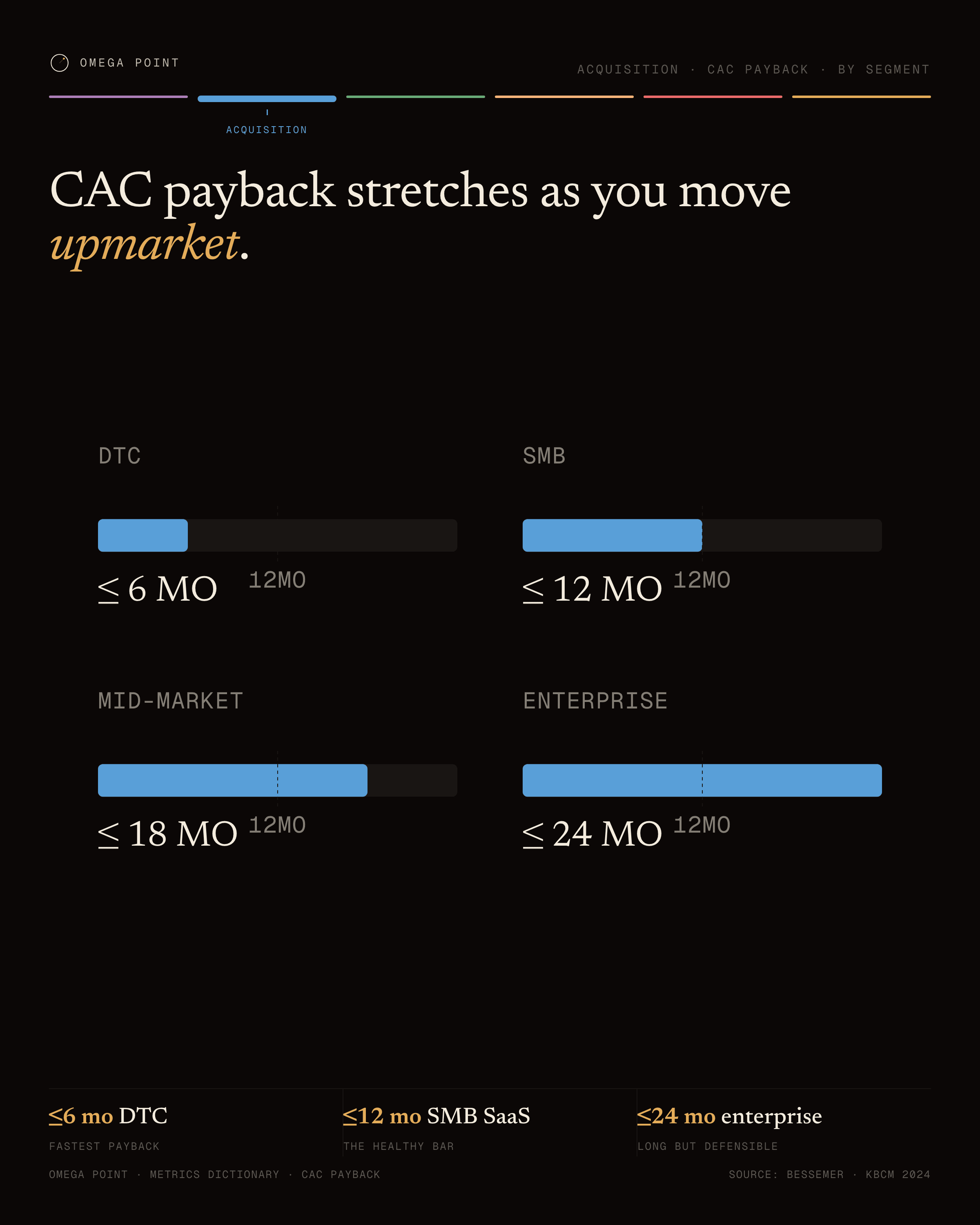
“CAC payback stretches as you move upmarket.” · live render →
DTC12MO≤ 6 MOSMB12MO≤ 12 MOMid-market12MO≤ 18 MOEnterprise12MO≤ 24 MO
Small multiples example, 16:9 figure: CAC payback stretches as you move upmarket.Small multiples example, 4:5 social card: CAC payback stretches as you move upmarket.
The config behind it · chart: SmallMultiplesChart
{
  "panels": [
    {
      "label": "DTC",
      "value": 6,
      "display": "≤ 6 MO"
    },
    {
      "label": "SMB",
      "value": 12,
      "display": "≤ 12 MO"
    },
    {
      "label": "Mid-market",
      "value": 18,
      "display": "≤ 18 MO"
    },
    {
      "label": "Enterprise",
      "value": 24,
      "display": "≤ 24 MO"
    }
  ],
  "domainMax": 24,
  "unit": "MO",
  "refTick": 12
}
№ 08 · waffle

Waffle

Use for
One striking percentage out of 100.
Data shape
A filled count out of a total (10×10 grid), the two cell colors, a caption, and which count the big fraction shows.
Config type
WaffleChart
Example
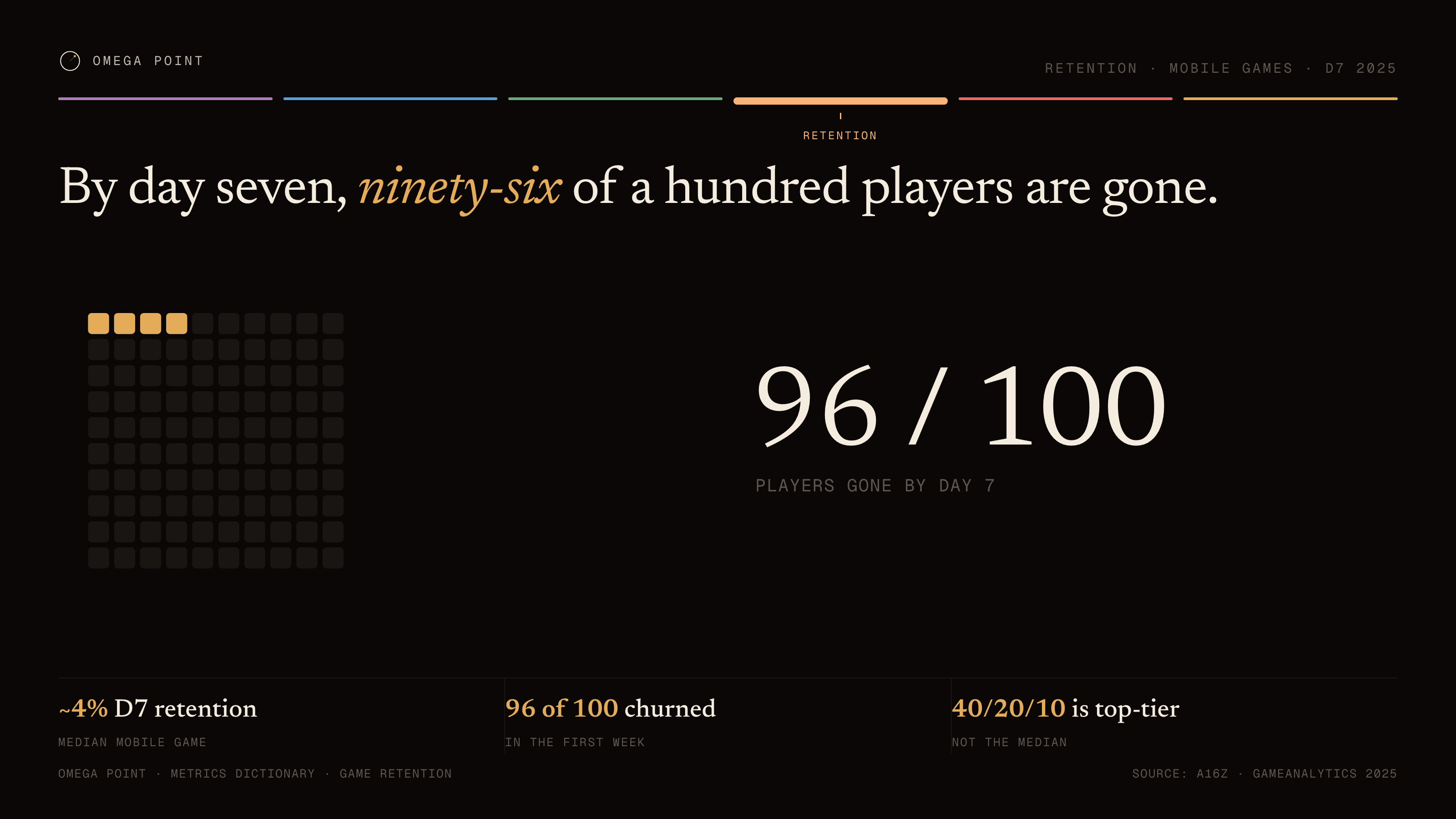
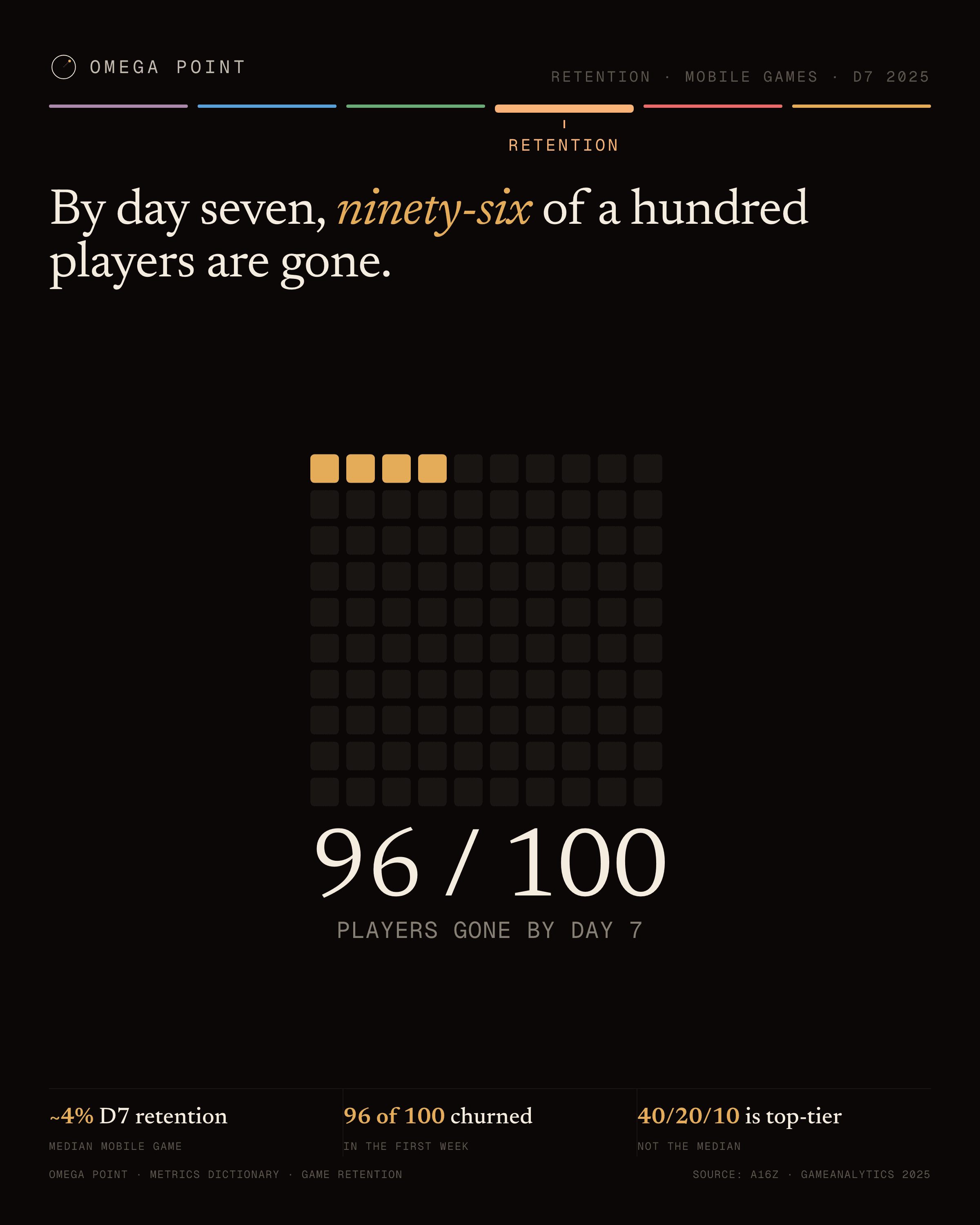
“By day seven, ninety-six of a hundred players are gone.” · live render →
96 / 100players gone by day 7
Waffle example, 16:9 figure: By day seven, ninety-six of a hundred players are gone.Waffle example, 4:5 social card: By day seven, ninety-six of a hundred players are gone.
The config behind it · chart: WaffleChart
{
  "value": 4,
  "total": 100,
  "emphasis": "empty",
  "filledColor": "var(--c1)",
  "mutedColor": "var(--rule-3)",
  "label": "players gone by day 7"
}
№ 09 · proportional-area

Proportional area

Use for
Relative magnitudes as area-sized bubbles, four or fewer.
Data shape
Bubbles with label, value (area ∝ value), display string, and an optional muted flag for the incumbent.
Config type
ProportionalAreaChart
Example
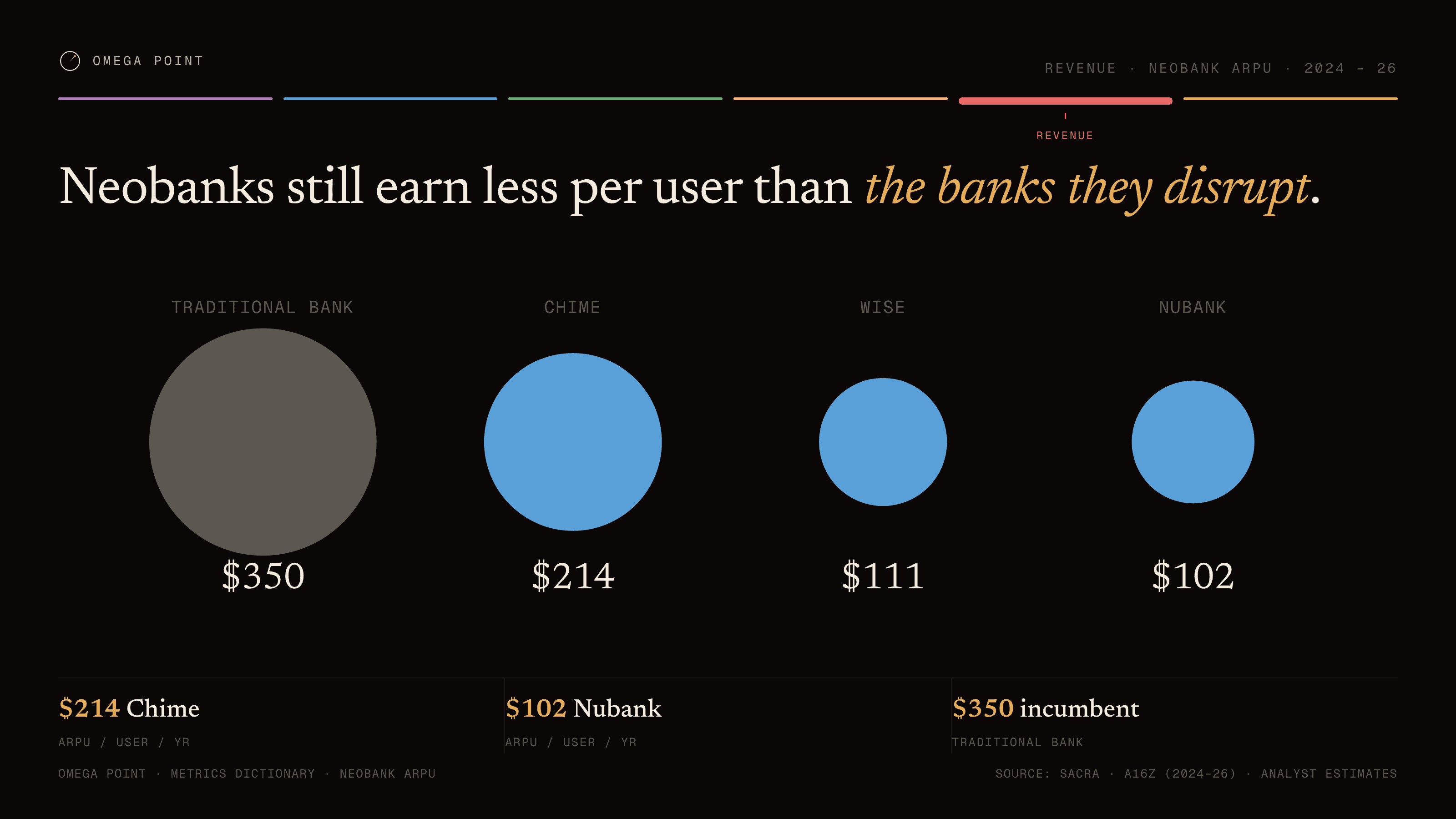
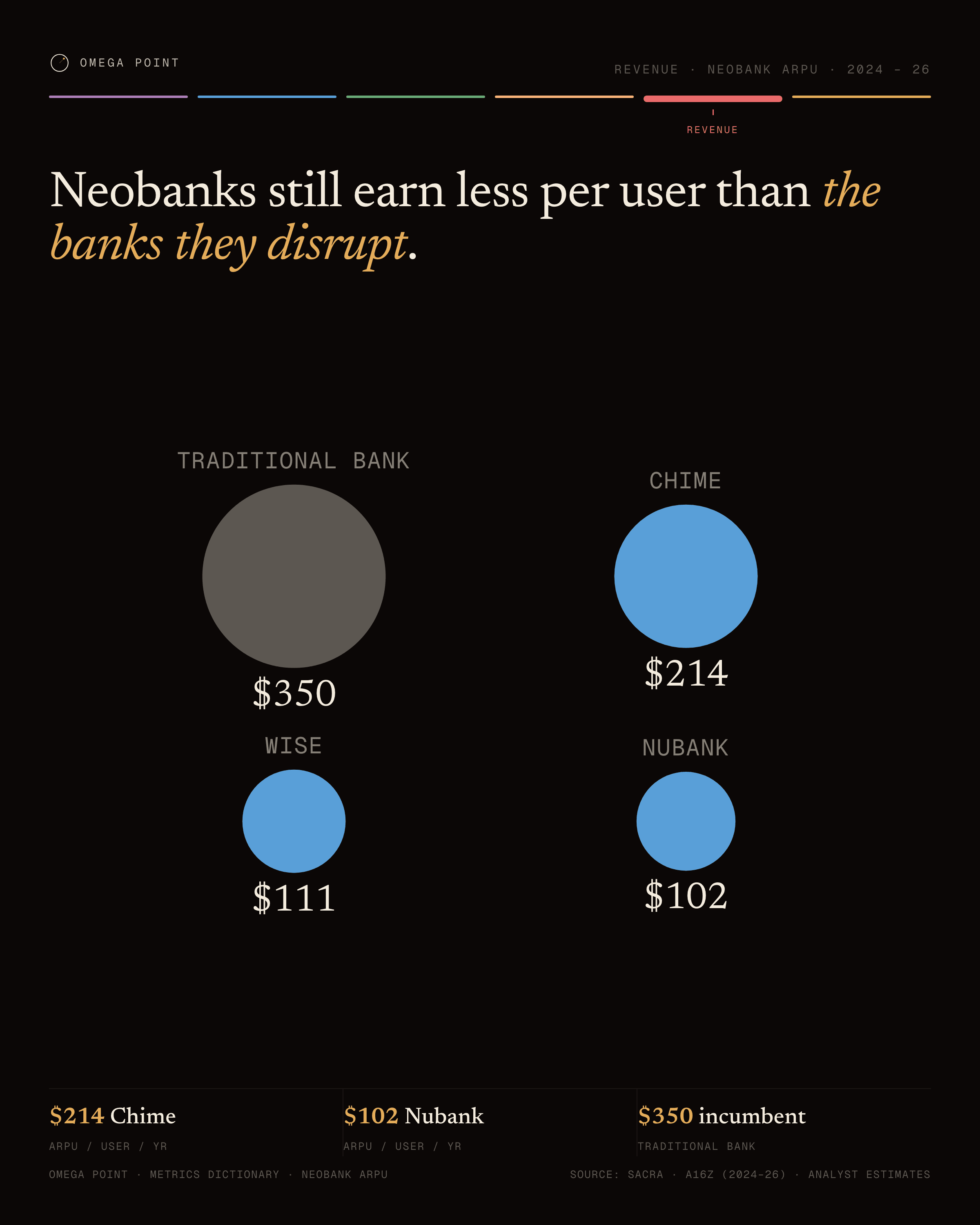
“Neobanks still earn less per user than the banks they disrupt.” · live render →
Traditional bank$350Chime$214Wise$111Nubank$102
Proportional area example, 16:9 figure: Neobanks still earn less per user than the banks they disrupt.Proportional area example, 4:5 social card: Neobanks still earn less per user than the banks they disrupt.
The config behind it · chart: ProportionalAreaChart
{
  "bubbles": [
    {
      "label": "Traditional bank",
      "value": 350,
      "display": "$350",
      "muted": true
    },
    {
      "label": "Chime",
      "value": 214,
      "display": "$214"
    },
    {
      "label": "Wise",
      "value": 111,
      "display": "$111"
    },
    {
      "label": "Nubank",
      "value": 102,
      "display": "$102"
    }
  ],
  "unit": "ARPU / USER / YEAR"
}
№ 10 · parliament

Parliament

Use for
Composition as seats in a semicircle; factions sum to roughly 100.
Data shape
Factions with label, seat count, color token, and percent label; a total seat count.
Config type
ParliamentChart
Example
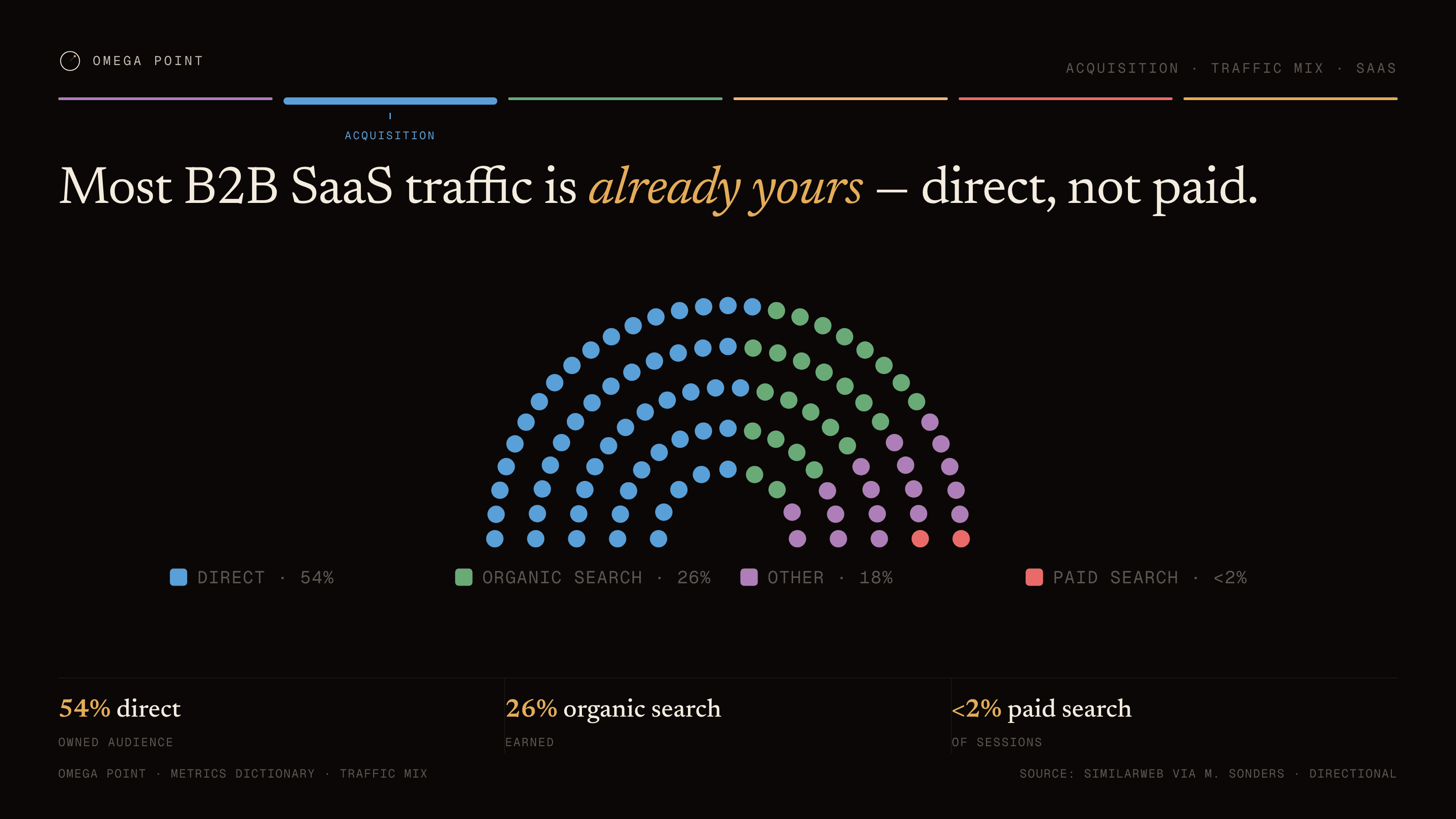
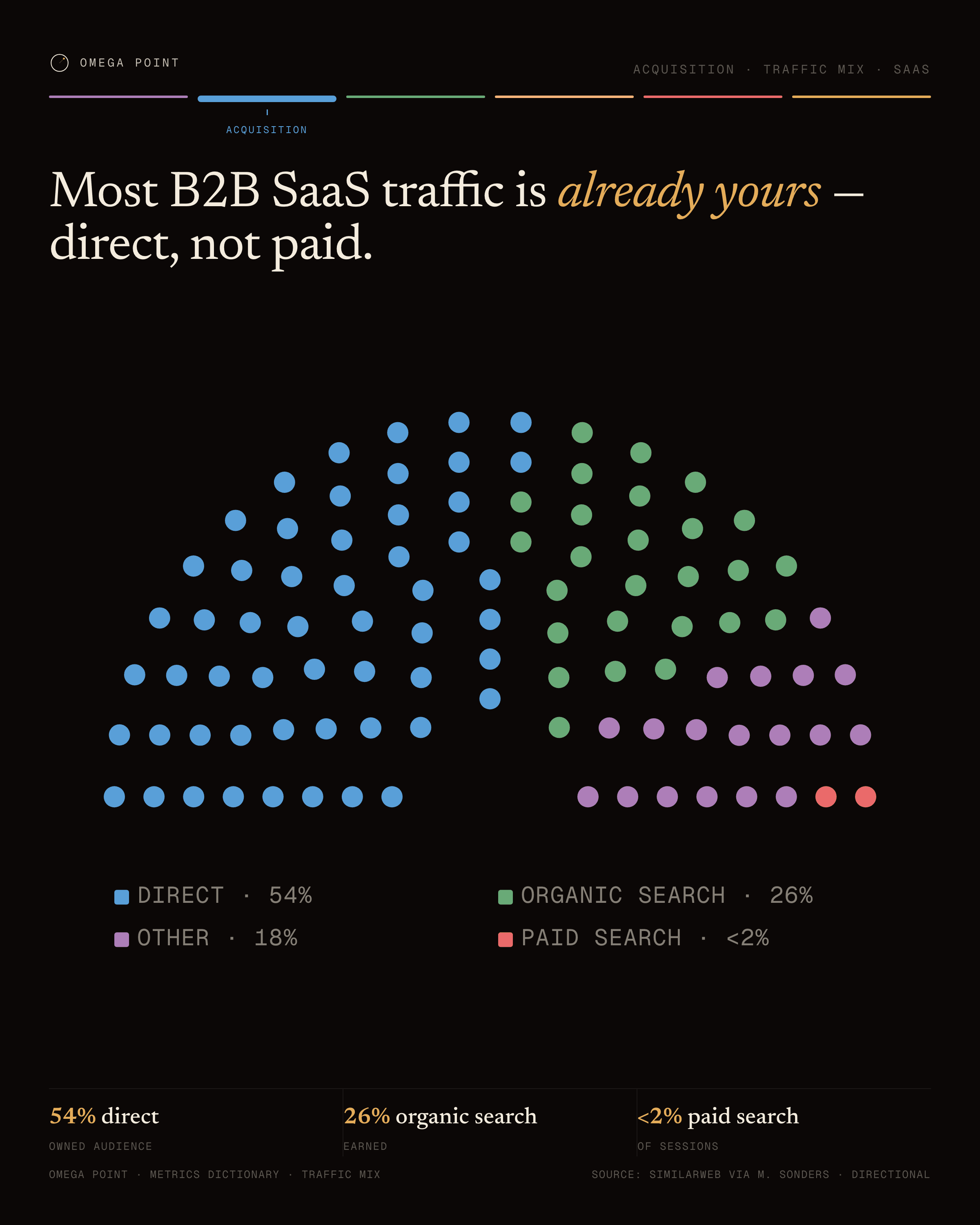
“Most B2B SaaS traffic is already yours — direct, not paid.” · live render →
Direct · 54%Organic search · 26%Other · 18%Paid search · <2%
Parliament example, 16:9 figure: Most B2B SaaS traffic is already yours — direct, not paid.Parliament example, 4:5 social card: Most B2B SaaS traffic is already yours — direct, not paid.
The config behind it · chart: ParliamentChart
{
  "factions": [
    {
      "label": "Direct",
      "value": 54,
      "color": "var(--c4)",
      "pct": "54%"
    },
    {
      "label": "Organic search",
      "value": 26,
      "color": "var(--c3)",
      "pct": "26%"
    },
    {
      "label": "Other",
      "value": 18,
      "color": "var(--c5)",
      "pct": "18%"
    },
    {
      "label": "Paid search",
      "value": 2,
      "color": "var(--c2)",
      "pct": "<2%"
    }
  ],
  "totalSeats": 100
}
№ 11 · vennframework

Venn

Use for
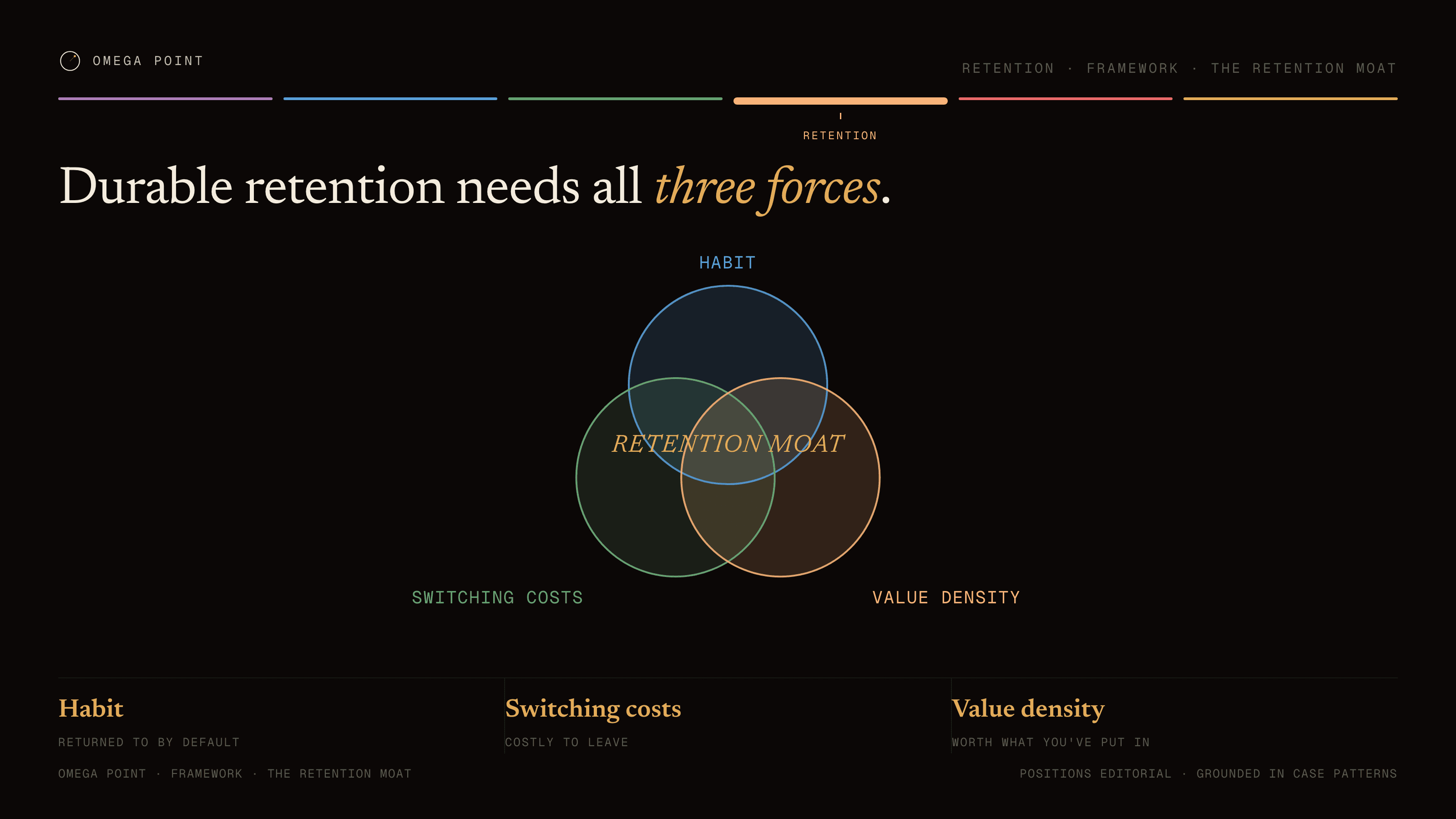
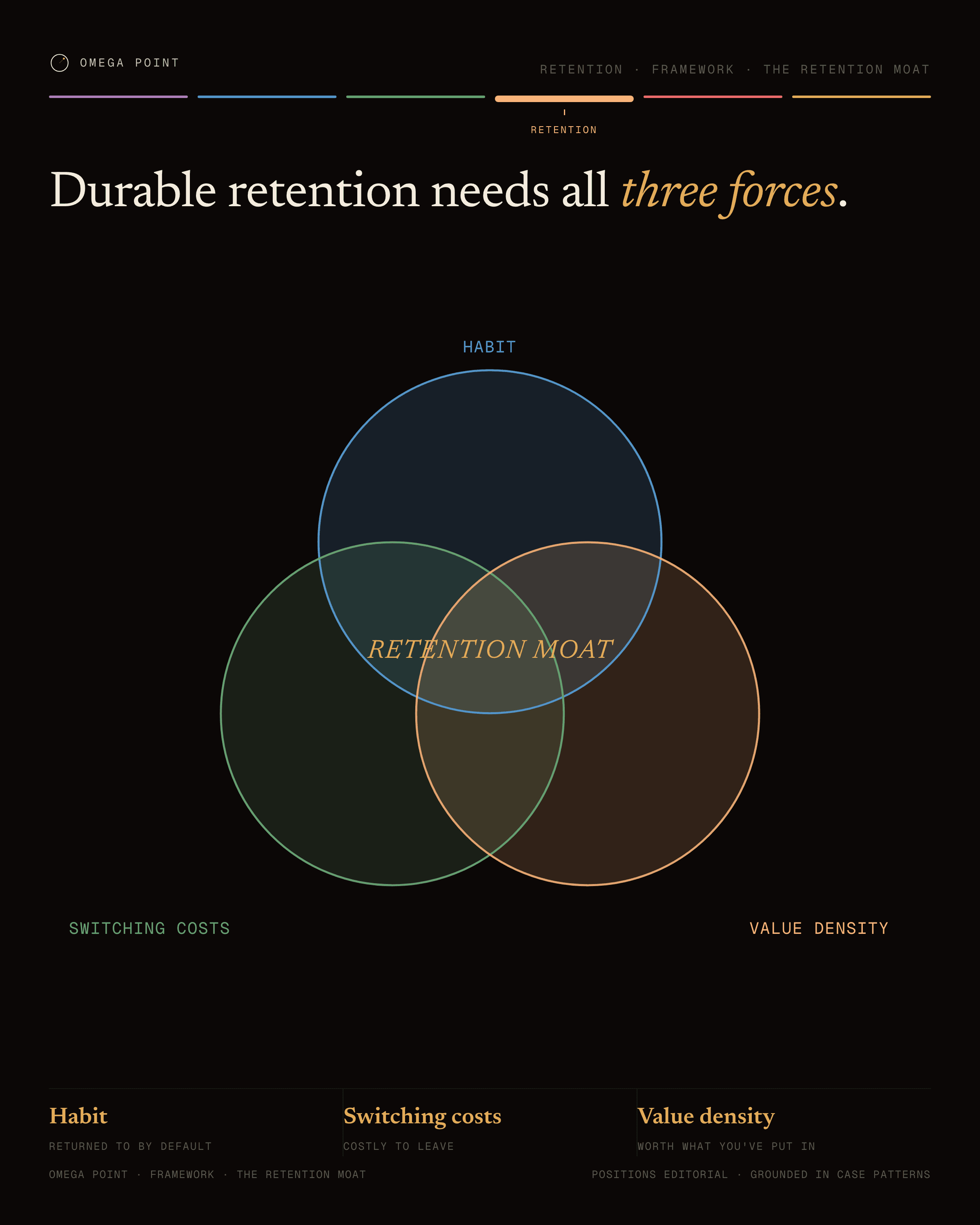
Three overlapping sets. A framework figure: the positions are editorial, not measured.
Data shape
Exactly three sets (label + color token) and a gold center label naming the overlap.
Config type
VennChart
Example
“Durable retention needs all three forces.” · live render →
RETENTION MOATHabitSwitching costsValue density
Venn example, 16:9 figure: Durable retention needs all three forces.Venn example, 4:5 social card: Durable retention needs all three forces.
The config behind it · chart: VennChart
{
  "sets": [
    {
      "label": "Habit",
      "color": "var(--c4)"
    },
    {
      "label": "Switching costs",
      "color": "var(--c3)"
    },
    {
      "label": "Value density",
      "color": "var(--c6)"
    }
  ],
  "centerLabel": "RETENTION MOAT"
}
№ 12 · matrixframework

2×2 matrix

Use for
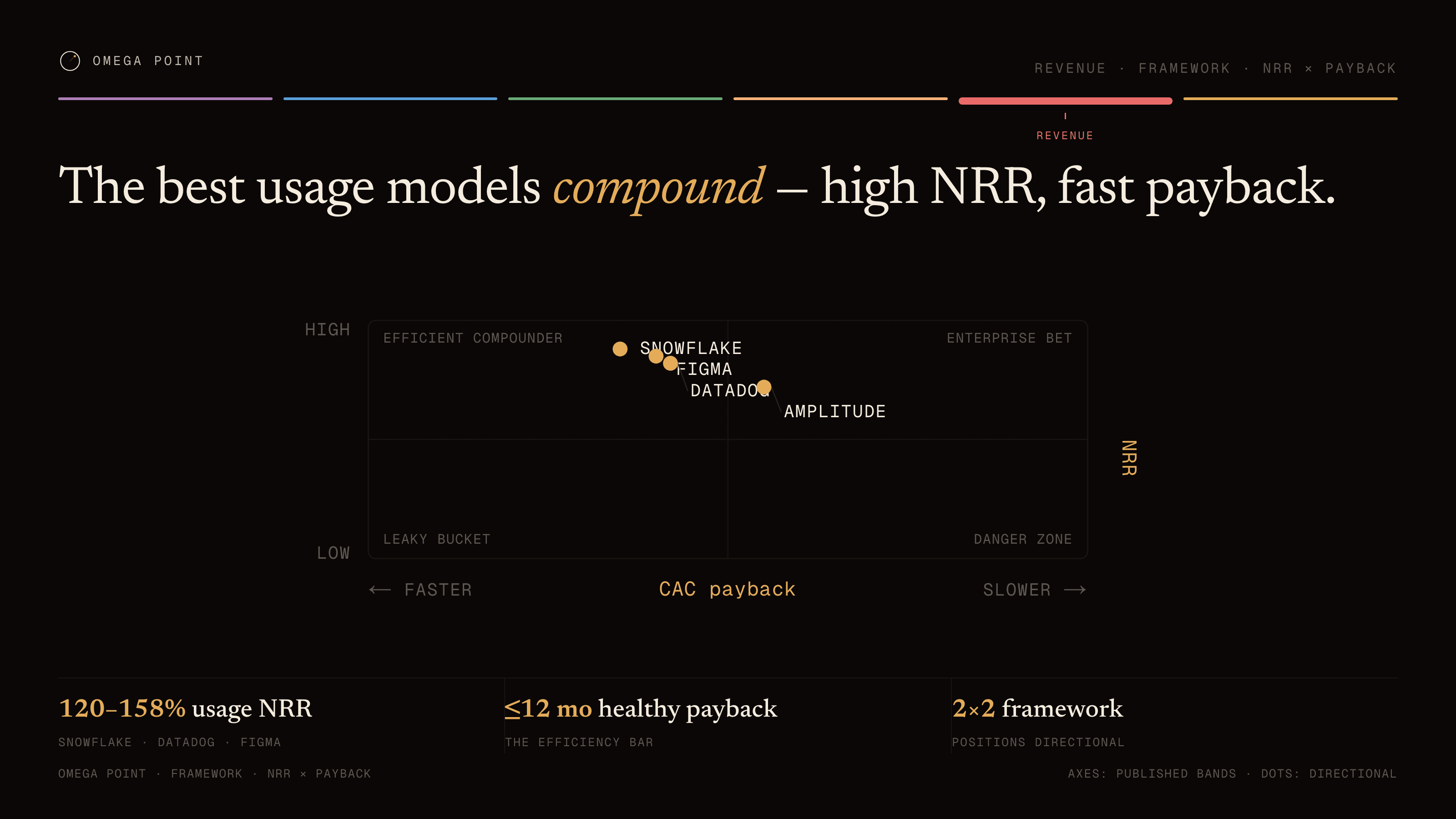
Two-axis positioning with one dot per actor. A framework figure: the positions are editorial, not measured.
Data shape
Two axes (label + low/high poles), four quadrant labels, and dots at normalized 0–100 x/y positions.
Config type
MatrixChart
Example
“The best usage models compound — high NRR, fast payback.” · live render →
Efficient compounderEnterprise betLeaky bucketDanger zoneNRRhighlowCAC payback← fasterslower →SnowflakeFigmaDatadogAmplitude
2×2 matrix example, 16:9 figure: The best usage models compound — high NRR, fast payback.2×2 matrix example, 4:5 social card: The best usage models compound — high NRR, fast payback.
The config behind it · chart: MatrixChart
{
  "xAxis": {
    "label": "CAC payback",
    "lowLabel": "faster",
    "highLabel": "slower"
  },
  "yAxis": {
    "label": "NRR",
    "lowLabel": "low",
    "highLabel": "high"
  },
  "quadrants": [
    "Efficient compounder",
    "Enterprise bet",
    "Leaky bucket",
    "Danger zone"
  ],
  "dots": [
    {
      "label": "Snowflake",
      "x": 35,
      "y": 88
    },
    {
      "label": "Datadog",
      "x": 42,
      "y": 82
    },
    {
      "label": "Figma",
      "x": 40,
      "y": 85
    },
    {
      "label": "Amplitude",
      "x": 55,
      "y": 72
    }
  ]
}
№ 13 · number-plate

Number plate

Use for
One hero number is the whole figure.
Data shape
A giant display value, a sublabel, and either a before/after comparison pair or a short note.
Config type
NumberPlateChart
Example
“Dropbox's referral loop turned 100K into 4M in fifteen months.” · live render →
39×
100K → 4M USERS · 15 MONTHS
100K · before the loop
4M · 15 months later
Registered users
Number plate example, 16:9 figure: Dropbox's referral loop turned 100K into 4M in fifteen months.Number plate example, 4:5 social card: Dropbox's referral loop turned 100K into 4M in fifteen months.
The config behind it · chart: NumberPlateChart
{
  "value": "39×",
  "sublabel": "100K → 4M USERS · 15 MONTHS",
  "compare": {
    "beforeLabel": "100K · before the loop",
    "beforeValue": 100000,
    "afterLabel": "4M · 15 months later",
    "afterValue": 4000000,
    "caption": "Registered users"
  }
}

The rules

These are what make thirteen different charts read as one system. Change the palette freely; change these and it stops being a system.

  1. Gold (--c1) is the semantic accent only. It marks the one thing the figure is about: the threshold, the median, the hero number, the emphasis span. Data series use --c2 through --c6 and --ink.
  2. One idea per figure. The headline states it in words; the chart proves it; the stat row quantifies it; the footer sources it.
  3. Every label is mono, uppercase, tracked. Every number that matters is serif and big.
  4. Rounded corners are small (rx ≈ 4). Hairlines use the rule ramp, never a solid mid-grey.
  5. Funnel bar order is fixed: awareness --c5, acquisition --c4, activation --c3, retention --c6, revenue --c2, referral --c1. It reads as a consistent legend across every figure and keeps the two warm tones apart.
  6. Honest sourcing. Cite a real source in the footer. Label derived, directional, or estimated values as such. Framework archetypes (venn, matrix) must say FRAMEWORK · POSITIONS EDITORIAL on the figure. Never invent precision.
  7. Look at the output. Export the PNG at full size and judge it by eye before it ships; a figure that passes the type-checker can still be wrong.

Adapting it to your brand

Replace the six series values and the ink and rule ramps in tokens.css. Keep one accent that is used semantically and five series colors that are not. Keep one mono face for labels and one display face for numbers. Keep the composition order and the sourcing rule. Then hand the edited SKILL.md to your agent and ask for a chart of numbers you can cite.

The spec is generated from the code in this site on every deploy. If a rendering detail changes, this page and the skill file change with it.